|
CRM64Pro GDK v0.80.0
A free cross-platform game development kit built on top of SDL 3.0
|
|
CRM64Pro GDK v0.80.0
A free cross-platform game development kit built on top of SDL 3.0
|
Timer module for timing control, frame rates and micro-benchmarking [v26.09.0].
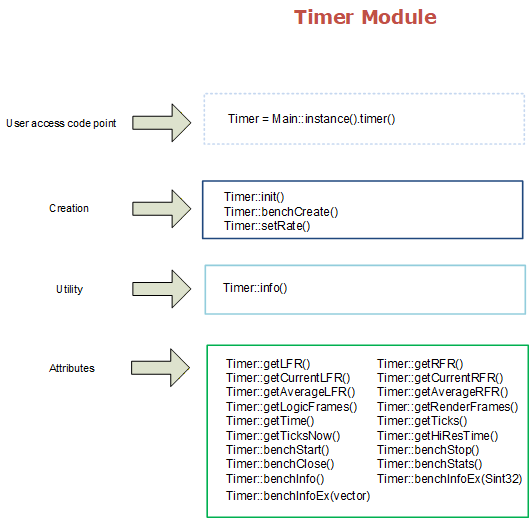
The Timer module manages all timing-related functionality including timer control, Render Frame Rate, Logic Frame Rate and micro-benchmarks. The Timer must be initiated with Timer::init().
One of the most important features is the fixed virtual logic frame rate with interpolation, which is implemented in this module and in Main::update() method. Rendering is scheduled on the main thread; see Threading conventions.
By default, no preferred Render and Logic Frame Rate are set (both equal to 0). Use setRate() to configure specific values. Rates can be throttled down, but upper limits are imposed by the underlying hardware and ConfigMgr::setMTFriendly() value.
| Render Frame Rate (RFR) | Independently scheduled main-thread rate that does not stop your main loop or create a render thread. Renders all enabled and visible screens at the preferred rate. This rate is not guaranteed as some render frames may be dropped to maintain stable LFR. When vsync is enabled, set RFR to 0 for smoothest output |
|---|---|
| Logic Frame Rate (LFR) | Synchronous rate that slows down your main loop to accommodate this rate. Under normal conditions (hardware can execute at preferred ratio), this rate remains quite stable |
The micro-benchmarking system measures small code snippets, capturing execution time and calculating statistical analysis on those measurements. It supports both latency and throughput benchmarks.
Benchmark metric types
| BM_LATENCY | Measures execution time in milliseconds (lower is better). Default type. |
|---|---|
| BM_THROUGHPUT | Measures base work units per second (higher is better). Requires workAmount in benchStop(). Output can be scaled automatically, for example from B/s to MB/s. |
Threading
Benchmarks are not generally thread-safe. Keep each benchmark on one thread:
Benchmark workflow
| benchCreate() | Create a named benchmark with estimated run count, unit, and metric type |
|---|---|
| benchStart() | Start a measurement cycle |
| benchStop() | Stop the current measurement cycle and optionally record work amount (for throughput benchmarks) |
| benchStats() | Retrieve statistical results into a Timer::Stats structure |
| benchInfo() | Display benchmark statistics to the default log |
| benchInfoEx() | Generate interactive HTML report with charts and statistics |
| benchClose() | Close the benchmark and release resources |
Deterministic function testing
Testing a function with a known number of iterations:
Application behavior profiling
Measuring logic and render performance throughout application lifetime:
Throughput benchmark (file I/O)
Measuring data processing throughput in MB/s:
Throughput benchmark (operations)
Measuring computational throughput in operations/second:
Classes | |
| class | CRM64Pro::Timer |
| Timer class. More... | |
Enumerations | |
| enum | CRM64Pro::eTimerState : Sint32 { CRM64Pro::TS_INIT = 0 , CRM64Pro::TS_RESET = 1 } |
| Timer init state. More... | |
Functions | |
| bool | CRM64Pro::Timer::info (Sint32 iMode=0) override |
| Request Timer module information. | |
| bool | CRM64Pro::Timer::init (eTimerState eState=TS_INIT) |
| Initialize the timer system. | |
| bool | CRM64Pro::Timer::setRate (Uint16 iR, Uint16 iL) |
| Set preferred Render and Logic Frame Rate. | |
| Sint32 | CRM64Pro::Timer::getLFR () const |
| Get the preferred Logic Frame Rate. | |
| Sint32 | CRM64Pro::Timer::getRFR () const |
| Get the preferred Render Frame Rate. | |
| float | CRM64Pro::Timer::getAverageRFR () const |
| Get the average Render Frame Rate since the last timer init or reset. | |
| float | CRM64Pro::Timer::getAverageLFR () const |
| Get the average Logic Frame Rate since the last timer init or reset. | |
| Uint32 | CRM64Pro::Timer::getCurrentRFR () const |
| Get current Render Frame Rate during last recent second. | |
| Uint32 | CRM64Pro::Timer::getCurrentLFR () const |
| Get current Logic Frame Rate during last recent second. | |
| Uint32 | CRM64Pro::Timer::getRenderFrames () const |
| Get total render frames since the last timer init or reset. | |
| Uint32 | CRM64Pro::Timer::getLogicFrames () const |
| Get total logic frames since the last timer init or reset. | |
| float | CRM64Pro::Timer::getTime () const |
| Get the execution time (in seconds) since the last timer init or reset. | |
| Uint64 | CRM64Pro::Timer::getTicks () const |
| Get the execution time (in milliseconds) since the last timer init or reset. | |
| Uint64 | CRM64Pro::Timer::getTicksNow () const |
| Get the execution time (in milliseconds) since the last timer init or reset. | |
| Uint64 | CRM64Pro::Timer::getHiResTime () const |
| Get the execution time (in nanoseconds) since the last timer init or reset. | |
| Sint32 | CRM64Pro::Timer::benchCreate (const string &sName, Sint32 iRuns=0, const string &sUnit="ms", eBenchMetric eMetric=BM_LATENCY) |
| Create a microbenchmark. | |
| bool | CRM64Pro::Timer::benchStart (Sint32 idBench) |
| Start a microbenchmark measurement cycle. | |
| bool | CRM64Pro::Timer::benchStop (Sint32 idBench, Uint64 workAmount=1) |
| Stop a microbenchmark measurement cycle. | |
| bool | CRM64Pro::Timer::benchClose (Sint32 idBench) |
| Close a microbenchmark. | |
| bool | CRM64Pro::Timer::benchStats (Sint32 idBench, Stats &stats) |
| Calculate the statistical analysis given the current measurements. | |
| bool | CRM64Pro::Timer::benchInfo (Sint32 idBench) |
| Display benchmark information to the default log. | |
| bool | CRM64Pro::Timer::benchInfoEx (Sint32 idBench, const string &sTitle="Report") |
| Generate HTML benchmark report for a single benchmark. | |
| bool | CRM64Pro::Timer::benchInfoEx (const vector< Sint32 > &vBenchIds, const string &sTitle="Report") |
| Generate HTML benchmark report for multiple benchmarks. | |
| enum CRM64Pro::eTimerState : Sint32 |
Timer init state.
| Enumerator | |
|---|---|
| TS_INIT | 'eState' parameter in Timer::init(), initializes or resets all timer settings. |
| TS_RESET | 'eState' parameter in Timer::init(), only resets the timer if it was previously initialized keeping RFR and LFR rates. |
|
override |
| bool CRM64Pro::Timer::init | ( | eTimerState | eState = TS_INIT | ) |
Initialize the timer system.
The first call to this method initializes the SDL timer subsystem.
| eState | Check ::eTimerState enum for further information. Default is TS_INIT. |
| bool CRM64Pro::Timer::setRate | ( | Uint16 | iR, |
| Uint16 | iL ) |
Set preferred Render and Logic Frame Rate.
| iR | preferred Render Frame Rate. Default 0 means unlimited. Maximum value is 500. |
| iL | preferred Logic Frame Rate. Default 0 means unlimited. Maximum value is 20000. |
| Sint32 CRM64Pro::Timer::getLFR | ( | ) | const |
Get the preferred Logic Frame Rate.
| Sint32 CRM64Pro::Timer::getRFR | ( | ) | const |
Get the preferred Render Frame Rate.
| float CRM64Pro::Timer::getAverageRFR | ( | ) | const |
Get the average Render Frame Rate since the last timer init or reset.
| float CRM64Pro::Timer::getAverageLFR | ( | ) | const |
Get the average Logic Frame Rate since the last timer init or reset.
| Uint32 CRM64Pro::Timer::getCurrentRFR | ( | ) | const |
Get current Render Frame Rate during last recent second.
| Uint32 CRM64Pro::Timer::getCurrentLFR | ( | ) | const |
Get current Logic Frame Rate during last recent second.
| Uint32 CRM64Pro::Timer::getRenderFrames | ( | ) | const |
Get total render frames since the last timer init or reset.
| Uint32 CRM64Pro::Timer::getLogicFrames | ( | ) | const |
Get total logic frames since the last timer init or reset.
| float CRM64Pro::Timer::getTime | ( | ) | const |
Get the execution time (in seconds) since the last timer init or reset.
This time will be constant inside the same Logic Frame iteration and will be updated on Main::update() if a new Logic Frame must be produced.
| Uint64 CRM64Pro::Timer::getTicks | ( | ) | const |
Get the execution time (in milliseconds) since the last timer init or reset.
This time will be constant inside the same Logic Frame iteration and will be updated on Main::update() if a new Logic Frame must be produced.
| Uint64 CRM64Pro::Timer::getTicksNow | ( | ) | const |
Get the execution time (in milliseconds) since the last timer init or reset.
This time will be exactly the "now" time, in other words, it is not linked anyway to the Logic Frame iteration.
| Uint64 CRM64Pro::Timer::getHiResTime | ( | ) | const |
Get the execution time (in nanoseconds) since the last timer init or reset.
This is the high resolution timer when you need more accurate time precision.
| Sint32 CRM64Pro::Timer::benchCreate | ( | const string & | sName, |
| Sint32 | iRuns = 0, | ||
| const string & | sUnit = "ms", | ||
| eBenchMetric | eMetric = BM_LATENCY ) |
Create a microbenchmark.
Creates a named benchmark with an estimated number of measurement runs.
| sName | string with the name of this benchmark. |
| iRuns | estimated number of runs. Default 0 (automatically managed). |
| sUnit | Display unit. ::BM_LATENCY requires "ms". For ::BM_THROUGHPUT, use the rate label matching workAmount (e.g., "B/s" or "ops/s"). No conversion is inferred from this string. |
| eMetric | metric direction: BM_LATENCY (lower is better) or BM_THROUGHPUT (higher is better). Default BM_LATENCY. |
| bool CRM64Pro::Timer::benchStart | ( | Sint32 | idBench | ) |
Start a microbenchmark measurement cycle.
| idBench | Bench id. |
| bool CRM64Pro::Timer::benchStop | ( | Sint32 | idBench, |
| Uint64 | workAmount = 1 ) |
Stop a microbenchmark measurement cycle.
Stops the measurement and records the elapsed time. For throughput benchmarks, also records the amount of work completed to calculate throughput.
| idBench | Bench id. |
| workAmount | Amount of work completed during this measurement cycle. For ::BM_LATENCY benchmarks, this value is ignored. For ::BM_THROUGHPUT benchmarks, pass the base work quantity matching sUnit (e.g., bytes for "B/s" or operations for "ops/s"). |
| bool CRM64Pro::Timer::benchClose | ( | Sint32 | idBench | ) |
Close a microbenchmark.
Frees the resources of the benchmark and its stats.
| idBench | Bench id. Use -1 to close all benchmarks. |
| bool CRM64Pro::Timer::benchStats | ( | Sint32 | idBench, |
| Stats & | stats ) |
| bool CRM64Pro::Timer::benchInfo | ( | Sint32 | idBench | ) |
Display benchmark information to the default log.
Outputs the benchmark statistics to the default log.
| idBench | Bench id. |
| bool CRM64Pro::Timer::benchInfoEx | ( | Sint32 | idBench, |
| const string & | sTitle = "Report" ) |
Generate HTML benchmark report for a single benchmark.
| idBench | Bench id. |
| sTitle | Report title used in the HTML and filename. Default "Report". |
| bool CRM64Pro::Timer::benchInfoEx | ( | const vector< Sint32 > & | vBenchIds, |
| const string & | sTitle = "Report" ) |
Generate HTML benchmark report for multiple benchmarks.
| vBenchIds | Vector of Bench ids to include in the report. |
| sTitle | Report title used in the HTML and filename. Default "Report". |