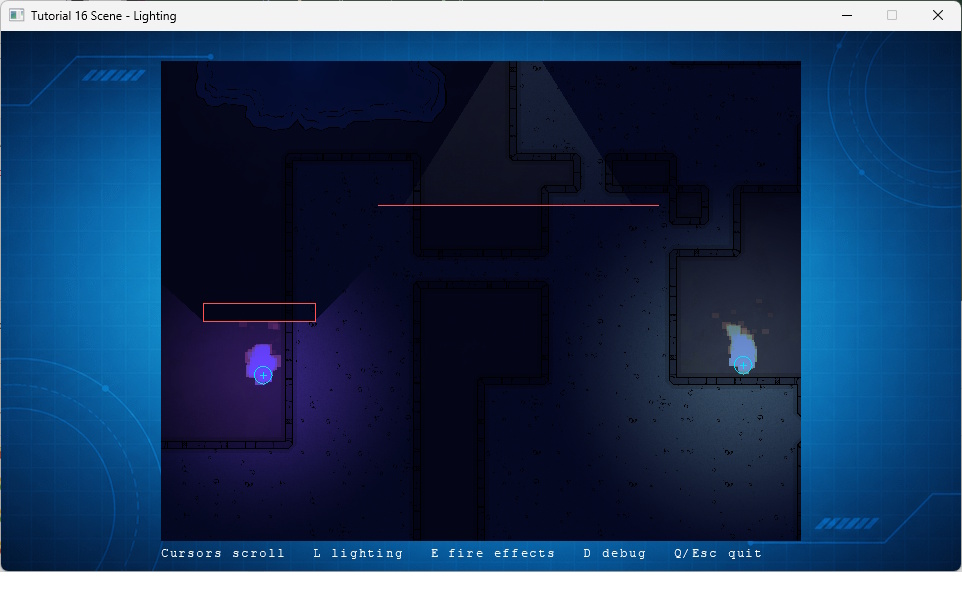
This tutorial keeps Scene lighting, light occlusion and particles in a small TMX map. It uses animated candle and pulse lights, a shadow-casting spotlight, and two fire effects. The C++ application only loads the Scene and provides independent runtime switches for lighting and particle effects.
The map enables lighting and particle effects separately. Ambient color and intensity darken the scene before individual lights are added.
The object ID supplies deterministic variation. The candle animation changes intensity, radius and color without per-frame application code.
An angle between 0 and 360 makes a spotlight. Its Tiled rotation gives its direction; the polyline below it blocks its light and casts the visible shadow.
The code uses the regular Scene loader. The map owns its lighting values; the application sets the viewport, enables smooth rendering layers, and explicitly starts lighting and particle effects.
Lighting, fire effects and debug shapes start enabled. The runtime controls intentionally use separate Scene switches, which makes the two systems easy to diagnose and offers a simple quality setting.
The tutorial source is authoritative. The following listing is included directly from validation/source/Tutorial_16_Scene_Lighting.cpp.
#include "CRM64Pro.h"
#include "RunParameter.h"
#define BASEDIR "Base/"
#ifdef CRM64PRO_PLATFORM_WINDOWS
#define OUTPUTDIR "Win64/"
#elif defined(CRM64PRO_PLATFORM_LINUX)
#define OUTPUTDIR "Linux/"
#elif defined(CRM64PRO_PLATFORM_MACOS)
#define OUTPUTDIR "macOS/"
#endif
#define RESOURCE_BG_CDC_NAME "Tutorial_bg"
#define OUTPUT_CDC OUTPUTDIR"Tutorial.cdc"
static const Sint32 iScreenW = 960;
static const Sint32 iScreenH = 540;
static const Sint32 iViewW = 640;
static const Sint32 iViewH = 480;
static const Sint32 iViewX = (iScreenW - iViewW) / 2;
static const Sint32 iViewY = (iScreenH - iViewH) / 2;
static const Sint32 iLogicRate = 20;
static const float fLogicStep = 1.0f / static_cast<float>(iLogicRate);
static const float fScrollSpeed = 320.0f;
struct TutorialState
{
Sint32 idBgImage = -1;
Sint32 idFont = -1;
bool bDebugShapes = true;
};
static TutorialState* g_pState = nullptr;
static Sint32 renderWrapper(Sint32)
{
if(!g_pState || !g_pState->pScene) return 0;
if(pBackground) pBackground->
render();
g_pState->pScene->render();
if(pFont)
{
pFont->
setPosition(
static_cast<float>(iViewX), 516.0f);
pFont->
render(
"Cursors scroll L lighting E fire effects D debug Q/Esc quit");
}
return 0;
}
static bool loadScene()
{
if(!g_pState) return false;
if(!g_pState->pScene) return false;
SDL_Rect rViewport = { iViewX, iViewY, iViewW, iViewH };
if(!g_pState->pScene->setViewport(&rViewport)
|| !g_pState->pScene->setLayerFeatures(1,
SLF_RENDER,
true)
|| !g_pState->pScene->setLayerFeatures(2,
SLF_SMOOTHSCROLL,
true))
return false;
g_pState->pScene->setLightingEnabled(true);
g_pState->pScene->setEffectsEnabled(true);
}
static void closeTutorial()
{
}
int main(int argc, char* argv[])
{
if(!runParameterReadRender(argc, argv, eRenderer)) return 1;
TutorialState State;
g_pState = &State;
OUTPUTDIR"Tutorial_16_Scene_Lighting.log");
{
return -1;
}
pScreen->
setSize(iScreenW, iScreenH);
pScreen->
setTitle(
"Tutorial 16 Scene - Lighting");
{
return -1;
}
State.idBgImage = mC64.
imageMgr().
load(OUTPUT_CDC, RESOURCE_BG_CDC_NAME);
if(State.idBgImage <= 0 || State.idFont <= 0 || !mC64.
fontMgr().
get(State.idFont) || !loadScene())
{
pLog->
msg(
LL_ERROR,
"Failed to load the lighting tutorial resources or Scene.\n");
closeTutorial();
return -1;
}
pLog->
msg(
LL_INFO,
"Lighting tutorial loaded. Cursors: scroll, L: lighting, E: fire effects, D: debug shapes.\n");
SDL_Event Event;
bool bDone = false;
while(!bDone)
{
{
if(Event.type == SDL_EVENT_QUIT) bDone = true;
if(Event.type != SDL_EVENT_KEY_DOWN) continue;
if(Event.key.key == SDLK_ESCAPE || Event.key.key == SDLK_Q) bDone = true;
else if(Event.key.key == SDLK_L)
{
const bool bEnabled = !State.pScene->isLightingEnabled();
State.pScene->setLightingEnabled(bEnabled);
pLog->
msg(
LL_INFO,
"Lighting: %s\n", bEnabled ?
"ON" :
"OFF");
}
else if(Event.key.key == SDLK_E)
{
const bool bEnabled = !State.pScene->isEffectsEnabled();
State.pScene->setEffectsEnabled(bEnabled);
pLog->
msg(
LL_INFO,
"Fire effects: %s\n", bEnabled ?
"ON" :
"OFF");
}
else if(Event.key.key == SDLK_D)
{
State.bDebugShapes = !State.bDebugShapes;
}
}
if(!bDone)
{
const float fStep = fScrollSpeed * fLogicStep;
float fDX = 0.0f;
float fDY = 0.0f;
if(fDX != 0.0f || fDY != 0.0f)
{
float fX = 0.0f;
float fY = 0.0f;
if(State.pScene->getLayerPosition(1, &fX, &fY) >= 0)
}
State.pScene->update();
}
}
closeTutorial();
return 0;
}
Screen * get(Sint32 idScreen=0)
Get a pointer to the screen using its handle.
Definition CoreConfig.cpp:1497
void setMTFriendly(Uint8 iDelayMS)
Set the multithread-friendly scheduler yield.
Definition CoreConfig.cpp:1183
Font Object class.
Definition CRM64Pro.h:4741
Sint32 render(const string &sText, bool bShowCursor=false, Sint32 iCurPos=-1, Sint32 idRes=0)
Render a text using this font.
Definition GraphicsFont.cpp:1095
bool setPosition(const Position &rPosX, const Position &rPosY, bool bInterpolate=false)
Set the font position.
Definition GraphicsFont.cpp:1037
Sint32 getBuiltin(const string &sName)
Get a built-in embedded font id using its name.
Definition GraphicsFont.cpp:1436
Sint32 close(Sint32 idFont) override
Close and destroy a font.
Definition GraphicsFont.cpp:1363
Font * get(const string &sName)
Get a pointer to the font using its name.
Definition GraphicsFont.cpp:1235
Image Object class.
Definition CRM64Pro.h:3356
Sint32 render(Sint32 idRes=0, SDL_FRect *pSrc=nullptr, SDL_FRect *pDst=nullptr)
Render the image.
Definition GraphicsImage.cpp:1575
Image * get(Sint32 idImg)
Get a pointer to the image using its handle.
Definition GraphicsImage.cpp:2279
Sint32 load(const string &sCDCFile, const string &sName)
Load an image stored in a CDC file.
Definition GraphicsImage.cpp:2476
Sint32 close(Sint32 idImg) override
Close and destroy an image.
Definition GraphicsImage.cpp:2178
Log Object class.
Definition CRM64Pro.h:771
CRM64Pro GDK Main class.
Definition CRM64Pro.h:502
Scene class.
Definition CRM64Pro.h:11200
Sint32 loadFromFile(const string &sTMXFile, ISceneObjectFactory *pFactory=nullptr)
Load a level from a TMX file.
Definition SceneMapLoad.cpp:1575
Screen Object class.
Definition CRM64Pro.h:1055
Sint32 show()
Show the screen.
Definition CoreConfig.cpp:362
Sint32 setDriver(eConfigRendererDriver eCRD)
Set the renderer driver.
Definition CoreConfig.cpp:454
bool setRenderCallback(RenderCallback fnCallback)
Set a callback function for rendering graphics at Render Frame Rate.
Definition CoreConfig.cpp:765
Sint32 setSize(Sint32 iWidth, Sint32 iHeight)
Set the size of the screen.
Definition CoreConfig.cpp:526
bool setTitle(const string &sName)
Set the title.
Definition CoreConfig.cpp:674
void setStatsLevel(eMemStatsLevel eMSL)
Set the memory stats gathering level.
Definition CMemoryManager.cpp:618
void destroy()
Releases the internal heap and displays final stats.
Definition CMemoryManager.cpp:954
@ MSL_HIGH
MSL_NORMAL plus deallocations and sizes logging for each module.
Definition CRM64Pro.h:387
eConfigRendererDriver
Screen renderer drivers.
Definition CRM64Pro.h:1013
@ CRD_SOFTWARE
Screen::setDriver(): software renderer driver. Slow but works on all platforms.
Definition CRM64Pro.h:1015
bool msg(eLogLevel eLL, const char *szFmt,...)
Write a message to the log.
Definition CoreLog.cpp:448
Log * get(Sint32 idLog=0)
Get a pointer to the log object.
Definition CoreLog.cpp:921
bool init(const string &sAppname, eLogLevel eLL, eLogMode eLM, const string &sFilename="", const string &sAuthor="", const string &sEmail="", const string &sWeb="")
Initialize the log object.
Definition CoreLog.cpp:338
@ LM_FILE
Log output mode for the 'lm' parameter in CRM64Pro::Log::init(). Output to a file and overwrite exist...
Definition CRM64Pro.h:748
@ LM_STDOUT
Log output mode for the 'lm' parameter in CRM64Pro::Log::init(). Output to standard output (stdout).
Definition CRM64Pro.h:750
@ LL_INFO
Runtime events (startup/shutdown). Messages without timestamp.
Definition CRM64Pro.h:764
@ LL_DEBUG
Detailed information for flow control.
Definition CRM64Pro.h:765
@ LL_ERROR
Runtime errors that do not require immediate termination.
Definition CRM64Pro.h:762
Timer & timer()
Get reference to Timer module.
Definition CoreMain.cpp:730
Sint32 update(SDL_Event *evUser=nullptr)
Manage the GDK update cycle with a fixed virtual logic frame rate.
Definition CoreMain.cpp:451
ImageMgr & imageMgr()
Get reference to Image Manager.
Definition CoreMain.cpp:754
SceneMgr & sceneMgr()
Get reference to Scene Manager.
Definition CoreMain.cpp:814
static void terminate()
Main explicit destructor.
Definition CoreMain.cpp:266
static Main & instance()
Access the Main singleton.
Definition CoreMain.cpp:252
LogMgr & logMgr()
Get reference to Log Manager.
Definition CoreMain.cpp:724
bool getKeyState(SDL_Keycode keycode) const
Get the current state of a key.
Definition CoreMain.cpp:686
FontMgr & fontMgr()
Get reference to Font Manager.
Definition CoreMain.cpp:778
ConfigMgr & configMgr()
Get reference to Config Manager.
Definition CoreMain.cpp:712
@ SLF_RENDER
Enable the rendering feature. Enabling this flag also enables SLF_UPDATE. Disabling render does not d...
Definition CRM64Pro.h:10079
@ SLF_SMOOTHSCROLL
Enable the smooth rendering feature. Check render() for further details.
Definition CRM64Pro.h:10080
@ SLF_UPDATE
Enable the updating feature. Check update() for further details.
Definition CRM64Pro.h:10078
@ SDO_OBJECT_SHAPE
Draw geometric shapes for selected object types.
Definition CRM64Pro.h:10094
@ SDOT_LIGHT
C64Light objects.
Definition CRM64Pro.h:10110
@ SDOT_OCCLUDER
C64Occluder objects.
Definition CRM64Pro.h:10111
@ SDOT_PARTICLE
C64Particle objects.
Definition CRM64Pro.h:10113
Sint32 close(Sint32 idScene) override
Close and destroy a Scene.
Definition Scene.cpp:2298
Scene * get(Sint32 idScene)
Get a pointer to the Scene using its handle.
Definition Scene.cpp:2355
bool init(eTimerState eState=TS_INIT)
Initialize the timer system.
Definition CoreTimer.cpp:543
bool setRate(Uint16 iR, Uint16 iL)
Set preferred Render and Logic Frame Rate.
Definition CoreTimer.cpp:556
CRM64Pro GDK.
Definition AudioTrack.cpp:36
Absolute coordinate or helper-relative position used by layout APIs.
Definition CRM64Pro.h:346
This is the last tutorial in the series.