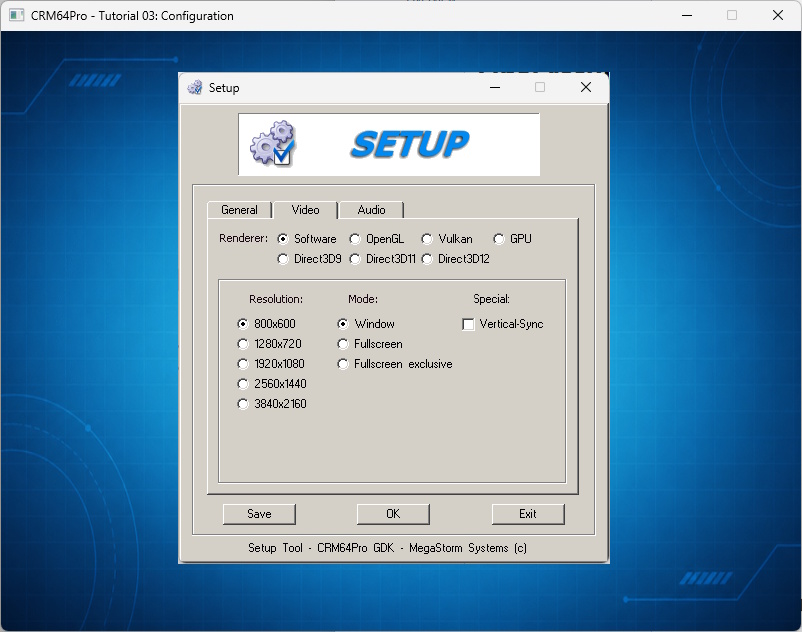
This tutorial extends Tutorial 02 with the built-in configuration screen. It stores config.xml in the existing Tutorial.cdc, then lets you save and load the active screen and audio settings while the application is running.
Loading a configuration recreates the default Screen, so the tutorial also shows how to restore state that belongs to that Screen.
The configuration is another named resource in the shared archive. The tutorial checks that Tutorial 02 has created the archive instead of silently creating one without the required images.
ConfigMgr::load() applies the saved settings and recreates the default Screen. The title and render callback are therefore assigned after every successful load.
The configuration resource does not replace the image blocks already stored by Tutorial 02. ImageMgr loads them by their original resource names.
Key events only set command flags. Setup, save and load run after the current Main::update() event batch has finished, keeping screen reconfiguration out of event dispatch.
The tutorial source is authoritative. The following listing is included directly from validation/source/Tutorial_03_Config.cpp.
#include "CRM64Pro.h"
#ifdef CRM64PRO_PLATFORM_WINDOWS
#define OUTPUTDIR "Win64/"
#elif defined(CRM64PRO_PLATFORM_LINUX)
#define OUTPUTDIR "Linux/"
#elif defined(CRM64PRO_PLATFORM_MACOS)
#define OUTPUTDIR "macOS/"
#endif
#define RESOURCE_BG_CDC_NAME "Tutorial_bg"
#define RESOURCE_PLAYER_CDC_NAME "Tutorial_ship"
#define RESOURCE_CONFIG_CDC_NAME "config.xml"
#define OUTPUT_CDC OUTPUTDIR"Tutorial.cdc"
static const Sint32 iLogicRate = 20;
static const Sint32 iRenderRate = 0;
struct TutorialState
{
Sint32 idBgImage = -1;
Sint32 idPlayerImage = -1;
};
static void logTaskOk(
Log& mLog)
{
}
static void logTaskFailed(
Log& mLog, Sint32 iCode)
{
mLog.msg(
LL_ERROR,
"FAILED (Code %d)\n", iCode);
}
static void logTaskFailed(
Log& mLog)
{
}
static void renderFrame(const TutorialState& rState)
{
if(!pScreen) return;
if(pBgImage)
{
SDL_FRect rBg = {
0.0f,
0.0f,
static_cast<float>(pScreen->
getWidth()),
};
pBgImage->
render(0,
nullptr, &rBg);
}
if(pPlayerImage)
{
SDL_FRect rPlayer = {
static_cast<float>(pPlayerImage->
getWidth()),
static_cast<float>(pPlayerImage->
getHeight())
};
pPlayerImage->
render(0,
nullptr, &rPlayer);
}
}
static Sint32 renderWrapper(Sint32, void* pObj)
{
TutorialState* pState = static_cast<TutorialState*>(pObj);
if(pState) renderFrame(*pState);
return 0;
}
static bool loadConfiguration(
Main& mC64,
Log& mLog, TutorialState& rState)
{
mLog.msg(
LL_INFO,
" Load configuration from CDC ... ");
const Sint32 iRet = mC64.
configMgr().
load(OUTPUT_CDC, RESOURCE_CONFIG_CDC_NAME);
if(iRet < 0)
{
logTaskFailed(mLog, iRet);
return false;
}
if(!pScreen)
{
logTaskFailed(mLog);
return false;
}
pScreen->
setTitle(
"CRM64Pro - Tutorial 03: Configuration");
if(!pScreen->
setRenderCallback([&rState](Sint32 iMode) { return renderWrapper(iMode, &rState); }))
{
logTaskFailed(mLog);
return false;
}
logTaskOk(mLog);
return true;
}
int main()
{
TutorialState state;
mLog.msg(
LL_INFO,
"\nSETUP: timing and Tutorial.cdc\n");
mLog.msg(
LL_INFO,
" Initialize timer ... ");
{
logTaskFailed(mLog);
return -1;
}
logTaskOk(mLog);
mLog.msg(
LL_INFO,
" Find Tutorial 02 CDC: %s ... ", OUTPUT_CDC);
{
logTaskFailed(mLog);
return -1;
}
logTaskOk(mLog);
mLog.msg(
LL_INFO,
" Open configuration screen ... ");
const Sint32 iSetupRet = mC64.
configMgr().
setup(RESOURCE_CONFIG_CDC_NAME, OUTPUT_CDC);
if(iSetupRet < 0)
{
logTaskFailed(mLog, iSetupRet);
return -1;
}
logTaskOk(mLog);
if(!loadConfiguration(mC64, mLog, state))
{
return -1;
}
mLog.msg(
LL_INFO,
"\nRESOURCES: load Tutorial 02 images\n");
mLog.msg(
LL_INFO,
" Load background image from CDC ... ");
state.idBgImage = mC64.
imageMgr().
load(OUTPUT_CDC, RESOURCE_BG_CDC_NAME);
if(state.idBgImage < 0)
{
logTaskFailed(mLog, state.idBgImage);
return -1;
}
logTaskOk(mLog);
mLog.msg(
LL_INFO,
" Load ship image from CDC ... ");
state.idPlayerImage = mC64.
imageMgr().
load(OUTPUT_CDC, RESOURCE_PLAYER_CDC_NAME);
if(state.idPlayerImage < 0)
{
logTaskFailed(mLog, state.idPlayerImage);
return -1;
}
logTaskOk(mLog);
if(pConsole) pConsole->
print(
"Tutorial 03: Configuration ready. Press ` to toggle the console.\n");
mLog.msg(
LL_INFO,
" [C] Open configuration screen\n");
mLog.msg(
LL_INFO,
" [S] Save current configuration\n");
mLog.msg(
LL_INFO,
" [L] Load saved configuration\n");
mLog.msg(
LL_INFO,
" [Q] / [ESC] Quit\n");
mLog.msg(
LL_INFO,
" [`] Toggle console\n");
SDL_Event event;
bool bRunning = true;
bool bOpenSetup = false;
bool bSaveConfig = false;
bool bLoadConfig = false;
while(bRunning)
{
{
if(event.type == SDL_EVENT_QUIT)
{
bRunning = false;
}
else if(event.type == SDL_EVENT_KEY_DOWN && !event.key.repeat)
{
if(event.key.key == SDLK_Q || event.key.key == SDLK_ESCAPE) bRunning = false;
else if(event.key.key == SDLK_C) bOpenSetup = true;
else if(event.key.key == SDLK_S) bSaveConfig = true;
else if(event.key.key == SDLK_L) bLoadConfig = true;
}
}
if(!bRunning) break;
if(bOpenSetup)
{
bOpenSetup = false;
mLog.msg(
LL_INFO,
" Open configuration screen ... ");
const Sint32 iRet = mC64.
configMgr().
setup(RESOURCE_CONFIG_CDC_NAME, OUTPUT_CDC);
if(iRet < 0) logTaskFailed(mLog, iRet);
else
{
logTaskOk(mLog);
if(!loadConfiguration(mC64, mLog, state)) bRunning = false;
}
}
if(bSaveConfig)
{
bSaveConfig = false;
mLog.msg(
LL_INFO,
" Save configuration to CDC ... ");
const Sint32 iRet = mC64.
configMgr().
save(RESOURCE_CONFIG_CDC_NAME, OUTPUT_CDC);
if(iRet < 0) logTaskFailed(mLog, iRet);
else logTaskOk(mLog);
}
if(bLoadConfig)
{
bLoadConfig = false;
if(!loadConfiguration(mC64, mLog, state)) bRunning = false;
}
}
mLog.msg(
LL_INFO,
" Close images and CDC archives ... ");
logTaskOk(mLog);
return 0;
}
Sint32 close(Sint32 idCDC) override
Close and destroy a CDC object.
Definition CoreArchive.cpp:2476
Screen * get(Sint32 idScreen=0)
Get a pointer to the screen using its handle.
Definition CoreConfig.cpp:1497
void setMTFriendly(Uint8 iDelayMS)
Set the multithread-friendly scheduler yield.
Definition CoreConfig.cpp:1183
Console Object class.
Definition CRM64Pro.h:9678
Image Object class.
Definition CRM64Pro.h:3356
Sint32 getHeight() const
Get the image height.
Definition GraphicsImage.cpp:1839
Sint32 getWidth() const
Get the image width.
Definition GraphicsImage.cpp:1833
Sint32 render(Sint32 idRes=0, SDL_FRect *pSrc=nullptr, SDL_FRect *pDst=nullptr)
Render the image.
Definition GraphicsImage.cpp:1575
Image * get(Sint32 idImg)
Get a pointer to the image using its handle.
Definition GraphicsImage.cpp:2279
Sint32 load(const string &sCDCFile, const string &sName)
Load an image stored in a CDC file.
Definition GraphicsImage.cpp:2476
Sint32 close(Sint32 idImg) override
Close and destroy an image.
Definition GraphicsImage.cpp:2178
Log Object class.
Definition CRM64Pro.h:771
CRM64Pro GDK Main class.
Definition CRM64Pro.h:502
Screen Object class.
Definition CRM64Pro.h:1055
Sint32 getHeight() const
Get the screen height.
Definition CoreConfig.cpp:562
Sint32 getWidth() const
Get the screen width.
Definition CoreConfig.cpp:549
bool setRenderCallback(RenderCallback fnCallback)
Set a callback function for rendering graphics at Render Frame Rate.
Definition CoreConfig.cpp:765
bool setTitle(const string &sName)
Set the title.
Definition CoreConfig.cpp:674
void setStatsLevel(eMemStatsLevel eMSL)
Set the memory stats gathering level.
Definition CMemoryManager.cpp:618
void destroy()
Releases the internal heap and displays final stats.
Definition CMemoryManager.cpp:954
@ MSL_NORMAL
Collect allocations per module (CRM64Pro and user). Default for debug builds.
Definition CRM64Pro.h:386
Sint32 load(const string &sCDCFile, const string &sConfigXML)
Load audio/screen configuration from a CDC file.
Definition CoreConfigSetup.cpp:2279
Sint32 save(const string &sConfigXML, const string &sCDCFile="")
Save current audio/screens configuration.
Definition CoreConfigSetup.cpp:2180
Sint32 setup(const string &sConfigXML, const string &sConfigCDC="", const string &sCustomSetupXML="", vector< string > *pArguments=nullptr)
Open the setup window for configuring audio/screen settings.
Definition CoreConfigSetup.cpp:2450
Sint32 print(const char *format,...)
Print a formatted message to the console.
Definition GUIConsole.cpp:403
Console * getConsole(Sint32 idGUI=CRM64PRO_GUI_CONSOLE)
Get a pointer to a Console using its handle.
Definition GUI.cpp:1366
Log * get(Sint32 idLog=0)
Get a pointer to the log object.
Definition CoreLog.cpp:921
bool init(const string &sAppname, eLogLevel eLL, eLogMode eLM, const string &sFilename="", const string &sAuthor="", const string &sEmail="", const string &sWeb="")
Initialize the log object.
Definition CoreLog.cpp:338
@ LM_FILE
Log output mode for the 'lm' parameter in CRM64Pro::Log::init(). Output to a file and overwrite exist...
Definition CRM64Pro.h:748
@ LM_STDOUT
Log output mode for the 'lm' parameter in CRM64Pro::Log::init(). Output to standard output (stdout).
Definition CRM64Pro.h:750
@ LL_INFO
Runtime events (startup/shutdown). Messages without timestamp.
Definition CRM64Pro.h:764
@ LL_DEBUG
Detailed information for flow control.
Definition CRM64Pro.h:765
@ LL_ERROR
Runtime errors that do not require immediate termination.
Definition CRM64Pro.h:762
GUIMgr & guiMgr()
Get reference to GUI Manager.
Definition CoreMain.cpp:808
Timer & timer()
Get reference to Timer module.
Definition CoreMain.cpp:730
Sint32 update(SDL_Event *evUser=nullptr)
Manage the GDK update cycle with a fixed virtual logic frame rate.
Definition CoreMain.cpp:451
ImageMgr & imageMgr()
Get reference to Image Manager.
Definition CoreMain.cpp:754
static void terminate()
Main explicit destructor.
Definition CoreMain.cpp:266
static Main & instance()
Access the Main singleton.
Definition CoreMain.cpp:252
LogMgr & logMgr()
Get reference to Log Manager.
Definition CoreMain.cpp:724
Tool & tool()
Get reference to Tool module.
Definition CoreMain.cpp:718
ArchiveMgr & archiveMgr()
Get reference to Archive Manager.
Definition CoreMain.cpp:736
ConfigMgr & configMgr()
Get reference to Config Manager.
Definition CoreMain.cpp:712
bool init(eTimerState eState=TS_INIT)
Initialize the timer system.
Definition CoreTimer.cpp:543
bool setRate(Uint16 iR, Uint16 iL)
Set preferred Render and Logic Frame Rate.
Definition CoreTimer.cpp:556
CRM64Pro GDK.
Definition AudioTrack.cpp:36
The next tutorial adds and loads a custom cursor resource.