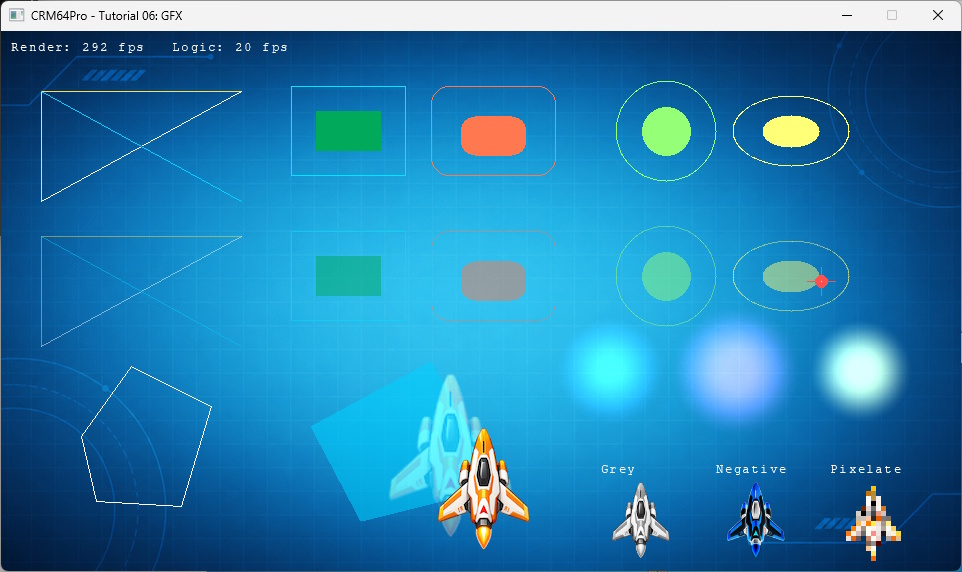
This tutorial extends Tutorial 05 with immediate GFX drawing, image filters, pixel access and additive glow helpers. It mixes these operations with normal Image and Font rendering in one Screen callback.
The tutorial adds no new CDC blocks. ImageMgr and CursorMgr load the existing resources by the stable names established earlier in the series.
GFX exposes immediate helpers for common shapes. The same function draws one opaque row and one translucent row by changing only the alpha argument.
Polygon helpers receive parallel coordinate arrays. The marker combines a filled circle, lines and a pixel, while the decorative effects use additive glow helpers.
ImageMgr::duplicate() keeps the source ship unchanged. Each duplicate applies one filter, and a failed filter closes its temporary Image before returning the actual error.
Select the loaded Cursor and make it visible.
The render callback first draws the background and immediate primitives. It then adds a glow behind the ship, renders the ship and finishes with filtered Images and text.
The G key queries CursorMgr immediately, avoiding stale stored coordinates. Mouse clicks already carry their exact coordinates in the SDL event.
A quit request exits before the final state update. Cleanup closes Fonts and Cursors before Images because those resources can own Images.
The tutorial source is authoritative. The following listing is included directly from validation/source/Tutorial_06_GFX.cpp.
#include "CRM64Pro.h"
#include "RunParameter.h"
#ifdef CRM64PRO_PLATFORM_WINDOWS
#define OUTPUTDIR "Win64/"
#elif defined(CRM64PRO_PLATFORM_LINUX)
#define OUTPUTDIR "Linux/"
#elif defined(CRM64PRO_PLATFORM_MACOS)
#define OUTPUTDIR "macOS/"
#endif
#define RESOURCE_BG_CDC_NAME "Tutorial_bg"
#define RESOURCE_PLAYER_CDC_NAME "Tutorial_ship"
#define RESOURCE_CURSOR_CDC_NAME "Tutorial_cursor"
#define OUTPUT_CDC OUTPUTDIR"Tutorial.cdc"
static const Sint32 iLogicRate = 20;
static const Sint32 iRenderRate = 0;
static const Sint32 iScreenW = 960;
static const Sint32 iScreenH = 540;
static const float fMoveSpeed = 220.0f;
struct TutorialState
{
Sint32 idBgImage = -1;
Sint32 idPlayerImage = -1;
Sint32 idFilterGrey = -1;
Sint32 idFilterNegative = -1;
Sint32 idFilterPixelate = -1;
Sint32 idCursor = -1;
Sint32 idBuiltInFont = -1;
Sint32 idDebugWindow = -1;
float fPlayerX = 386.0f;
float fPlayerY = 186.0f;
float fMouseX = 0.0f;
float fMouseY = 0.0f;
float fMarkerX = 820.0f;
float fMarkerY = 250.0f;
Sint32 iCurrentRenderRate = 0;
Sint32 iCurrentLogicRate = 0;
Sint32 iLogicFrames = 0;
Uint32 iLastPixel = 0;
bool bMoveLeft = false;
bool bMoveRight = false;
bool bMoveUp = false;
bool bMoveDown = false;
};
static float clampFloat(float fValue, float fMin, float fMax)
{
if(fValue < fMin) return fMin;
if(fValue > fMax) return fMax;
return fValue;
}
static void logTaskOk(
Log& mLog)
{
}
static void logTaskFailed(
Log& mLog, Sint32 iCode)
{
mLog.msg(
LL_ERROR,
"FAILED (Code %d)\n", iCode);
}
static void logTaskFailed(
Log& mLog)
{
}
static void updateLogic(TutorialState& rState,
Image* pPlayerImage,
float fDeltaTime)
{
if(!pPlayerImage) return;
float fDX = 0.0f;
float fDY = 0.0f;
if(rState.bMoveLeft) fDX -= fMoveSpeed * fDeltaTime;
if(rState.bMoveRight) fDX += fMoveSpeed * fDeltaTime;
if(rState.bMoveUp) fDY -= fMoveSpeed * fDeltaTime;
if(rState.bMoveDown) fDY += fMoveSpeed * fDeltaTime;
const float fMaxX =
static_cast<float>(iScreenW - pPlayerImage->
getWidth());
const float fMaxY =
static_cast<float>(iScreenH - pPlayerImage->
getHeight());
rState.fPlayerX = clampFloat(rState.fPlayerX + fDX, 0.0f, fMaxX);
rState.fPlayerY = clampFloat(rState.fPlayerY + fDY, 0.0f, fMaxY);
rState.iLogicFrames++;
}
static void renderPrimitiveRow(float fOffsetY, Uint8 iAlpha)
{
mGFX.
lineH(40, 240, 60 + fOffsetY, 255, 220, 80, iAlpha);
mGFX.
lineV(40, 60 + fOffsetY, 170 + fOffsetY, 255, 220, 80, iAlpha);
mGFX.
line(40, 170 + fOffsetY, 240, 60 + fOffsetY, 255, 255, 255, iAlpha);
mGFX.
line(40, 60 + fOffsetY, 240, 170 + fOffsetY, 0, 210, 255, iAlpha);
mGFX.
rect(290, 55 + fOffsetY, 405, 145 + fOffsetY, 0, 230, 255, iAlpha);
mGFX.
rectFilled(315, 80 + fOffsetY, 380, 120 + fOffsetY, 0, 170, 90, iAlpha);
mGFX.
rectRound(430, 55 + fOffsetY, 555, 145 + fOffsetY, 18, 255, 120, 80, iAlpha);
mGFX.
rectFilledRound(460, 85 + fOffsetY, 525, 125 + fOffsetY, 14, 255, 120, 80, iAlpha);
mGFX.
circle(665, 100 + fOffsetY, 50, 150, 255, 120, iAlpha);
mGFX.
circleFilled(665, 100 + fOffsetY, 24, 150, 255, 120, iAlpha);
mGFX.
ellipse(790, 100 + fOffsetY, 58, 35, 255, 255, 120, iAlpha);
mGFX.
ellipseFilled(790, 100 + fOffsetY, 28, 16, 255, 255, 120, iAlpha);
}
static void renderGFX(const TutorialState& rState)
{
renderPrimitiveRow(0.0f, 255);
renderPrimitiveRow(145.0f, 120);
float fPolyX[5] = { 80.0f, 130.0f, 210.0f, 180.0f, 95.0f };
float fPolyY[5] = { 405.0f, 335.0f, 375.0f, 475.0f, 470.0f };
float fFillX[4] = { 310.0f, 430.0f, 500.0f, 360.0f };
float fFillY[4] = { 395.0f, 330.0f, 455.0f, 490.0f };
mGFX.
polygon(fPolyX, fPolyY, 5, 255, 255, 255, 255);
mGFX.
circleFilled(rState.fMarkerX, rState.fMarkerY, 6, 255, 80, 80, 255);
mGFX.
lineH(rState.fMarkerX - 14.0f, rState.fMarkerX + 14.0f, rState.fMarkerY, 255, 80, 80, 255);
mGFX.
lineV(rState.fMarkerX, rState.fMarkerY - 14.0f, rState.fMarkerY + 14.0f, 255, 80, 80, 255);
mGFX.
setPixel(rState.fMarkerX, rState.fMarkerY, 255, 255, 255, 255);
mGFX.
drawGlow(610, 340, 58, 80, 180, 255, 160, 0.80f);
mGFX.
drawFlash(860, 340, 54, 255, 235, 120, 210, 1.0f);
}
static void renderText(
Font* pBuiltInFont, Sint32 iX, Sint32 iY,
const char* szText)
{
if(!pBuiltInFont) return;
}
static void renderFilterSamples(
Font* pBuiltInFont,
const TutorialState& rState)
{
const Sint32 iFilters[3] = { rState.idFilterGrey, rState.idFilterNegative, rState.idFilterPixelate };
const char* szLabels[3] = { "Grey", "Negative", "Pixelate" };
for(Sint32 i = 0; i < 3; ++i)
{
if(!pImage) continue;
SDL_FRect rDst = {
600.0f + static_cast<float>(i * 115),
450.0f,
80.0f,
80.0f
};
pImage->
render(0,
nullptr, &rDst);
renderText(pBuiltInFont, static_cast<Sint32>(rDst.x), 432, szLabels[i]);
}
}
static void renderRates(
Font* pBuiltInFont,
const TutorialState& rState)
{
if(!pBuiltInFont) return;
char szRates[96];
snprintf(szRates, sizeof(szRates), "Render: %d fps Logic: %d fps", rState.iCurrentRenderRate, rState.iCurrentLogicRate);
renderText(pBuiltInFont, 10, 10, szRates);
}
static void renderFrame(
Image* pBgImage,
Image* pPlayerImage,
Font* pBuiltInFont,
const TutorialState& rState)
{
if(pBgImage) pBgImage->
render();
renderGFX(rState);
if(pPlayerImage)
{
SDL_FRect rDst = {
rState.fPlayerX,
rState.fPlayerY,
static_cast<float>(pPlayerImage->
getWidth()),
static_cast<float>(pPlayerImage->
getHeight())
};
Main::instance().gfx().drawGlowImage(rState.idPlayerImage, rState.fPlayerX + 32.0f, rState.fPlayerY + 32.0f, 1.35f, 255, 180, 70, 130, 0.70f);
pPlayerImage->
render(0,
nullptr, &rDst);
}
renderFilterSamples(pBuiltInFont, rState);
renderRates(pBuiltInFont, rState);
}
static bool createFilteredImage(
Main& mC64,
Log& mLog, Sint32 idSource,
const char* szName,
eImageFilter eFilter, Sint32 iValue, Sint32& rID)
{
mLog.msg(
LL_INFO,
" Create %s filter sample ... ", szName);
if(rID < 0 || pImage == nullptr)
{
logTaskFailed(mLog, rID);
return false;
}
const Sint32 iRet = pImage->
applyFilter(eFilter, iValue);
if(iRet < 0)
{
logTaskFailed(mLog, iRet);
rID = -1;
return false;
}
logTaskOk(mLog);
return true;
}
static Sint32 renderWrapper(Sint32, void* pObj)
{
TutorialState* pState = static_cast<TutorialState*>(pObj);
if(!pState) return 0;
renderFrame(pBgImage, pPlayerImage, pBuiltInFont, *pState);
return 0;
}
{
if(!pDebug) return;
}
int main(int argc, char* argv[])
{
if(!runParameterReadRender(argc, argv, eRenderer)) return 1;
TutorialState state;
mLog.msg(
LL_INFO,
"\nSETUP: screen and timing\n");
mLog.msg(
LL_INFO,
" Initialize timer ... ");
{
logTaskFailed(mLog);
return -1;
}
logTaskOk(mLog);
mLog.msg(
LL_INFO,
" Set frame rates (render=%d, logic=%d) ... ", iRenderRate, iLogicRate);
{
logTaskFailed(mLog);
return -1;
}
logTaskOk(mLog);
pScreen->
setSize(iScreenW, iScreenH);
pScreen->
setTitle(
"CRM64Pro - Tutorial 06: GFX");
mLog.msg(
LL_INFO,
" Create screen (%dx%d) ... ", iScreenW, iScreenH);
{
return -1;
}
logTaskOk(mLog);
mLog.msg(
LL_INFO,
" Set render callback ... ");
if(!pScreen->
setRenderCallback([&state](Sint32 iMode) { return renderWrapper(iMode, &state); }))
{
logTaskFailed(mLog);
return -1;
}
logTaskOk(mLog);
mLog.msg(
LL_INFO,
"\nRESOURCES: load from CDC\n");
mLog.msg(
LL_INFO,
" Load background image from CDC ... ");
state.idBgImage = mC64.
imageMgr().
load(OUTPUT_CDC, RESOURCE_BG_CDC_NAME);
if(state.idBgImage < 0)
{
logTaskFailed(mLog, state.idBgImage);
return -1;
}
logTaskOk(mLog);
mLog.msg(
LL_INFO,
" Load ship image from CDC ... ");
state.idPlayerImage = mC64.
imageMgr().
load(OUTPUT_CDC, RESOURCE_PLAYER_CDC_NAME);
if(state.idPlayerImage < 0)
{
logTaskFailed(mLog, state.idPlayerImage);
return -1;
}
logTaskOk(mLog);
if(pPlayerImage == nullptr)
{
logTaskFailed(mLog);
return -1;
}
mLog.msg(
LL_INFO,
"\nFILTERS: duplicate ship and apply filters\n");
if(!createFilteredImage(mC64, mLog, state.idPlayerImage,
"TutorialFilterGrey",
IF_GREY, 0, state.idFilterGrey) ||
!createFilteredImage(mC64, mLog, state.idPlayerImage,
"TutorialFilterNegative",
IF_NEGATIVE, 0, state.idFilterNegative) ||
!createFilteredImage(mC64, mLog, state.idPlayerImage,
"TutorialFilterPixelate",
IF_PIXELATE, 8, state.idFilterPixelate))
{
return -1;
}
mLog.msg(
LL_INFO,
" Load cursor from CDC ... ");
state.idCursor = mC64.
cursorMgr().
load(OUTPUT_CDC, RESOURCE_CURSOR_CDC_NAME);
if(state.idCursor < 0 || pCursor == nullptr)
{
logTaskFailed(mLog, state.idCursor);
return -1;
}
logTaskOk(mLog);
mLog.msg(
LL_INFO,
" Select cursor ... ");
{
logTaskFailed(mLog);
return -1;
}
logTaskOk(mLog);
mLog.msg(
LL_INFO,
" Load built-in font ... ");
if(state.idBuiltInFont < 0 || pBuiltInFont == nullptr)
{
logTaskFailed(mLog, state.idBuiltInFont);
return -1;
}
logTaskOk(mLog);
mLog.msg(
LL_INFO,
"\nTOOLS: GFX, glow helpers, debug window and console\n");
mLog.msg(
LL_INFO,
" Access GFX interface ... ");
(void)mGFX;
logTaskOk(mLog);
mLog.msg(
LL_INFO,
" Create debug window ... ");
if(!pDebug)
{
logTaskFailed(mLog, state.idDebugWindow);
return -1;
}
pDebug->
addWatch(
"Player X",
nullptr, &state.fPlayerX);
pDebug->
addWatch(
"Player Y",
nullptr, &state.fPlayerY);
pDebug->
addWatch(
"Mouse X",
nullptr, &state.fMouseX);
pDebug->
addWatch(
"Mouse Y",
nullptr, &state.fMouseY);
pDebug->
addWatch(
"Marker X",
nullptr, &state.fMarkerX);
pDebug->
addWatch(
"Marker Y",
nullptr, &state.fMarkerY);
pDebug->
addWatch(
"Render fps", &state.iCurrentRenderRate);
pDebug->
addWatch(
"Logic fps", &state.iCurrentLogicRate);
pDebug->
addWatch(
"Logic frames", &state.iLogicFrames);
logTaskOk(mLog);
if(pConsole) pConsole->
print(
"Tutorial 06: GFX ready. Press ` to toggle the console.\n");
mLog.msg(
LL_INFO,
" [Q] / [ESC] Quit\n");
mLog.msg(
LL_INFO,
" [Arrow Keys] Move the ship image\n");
mLog.msg(
LL_INFO,
" [G] Read pixel color under the cursor\n");
mLog.msg(
LL_INFO,
" [D] Toggle debug window\n");
mLog.msg(
LL_INFO,
" [`] Toggle console\n");
mLog.msg(
LL_INFO,
" Any key or mouse button logs the input event\n");
SDL_Event event;
bool bRunning = true;
while(bRunning)
{
{
if(event.type == SDL_EVENT_QUIT)
{
bRunning = false;
}
else if(event.type == SDL_EVENT_KEY_DOWN)
{
mLog.msg(
LL_INFO,
" Key pressed: %s (%d)\n", SDL_GetKeyName(event.key.key), event.key.key);
if(event.key.key == SDLK_Q || event.key.key == SDLK_ESCAPE)
{
bRunning = false;
}
else if(event.key.key == SDLK_LEFT)
{
state.bMoveLeft = true;
}
else if(event.key.key == SDLK_RIGHT)
{
state.bMoveRight = true;
}
else if(event.key.key == SDLK_UP)
{
state.bMoveUp = true;
}
else if(event.key.key == SDLK_DOWN)
{
state.bMoveDown = true;
}
else if(event.key.key == SDLK_G)
{
state.iLastPixel = mC64.
gfx().
getPixel(state.fMarkerX, state.fMarkerY);
mLog.msg(
LL_INFO,
" Pixel at %.0f, %.0f: %#08x\n", state.fMarkerX, state.fMarkerY, state.iLastPixel);
}
else if(event.key.key == SDLK_D)
{
toggleDebugWindow(pDebug);
}
}
else if(event.type == SDL_EVENT_KEY_UP)
{
if(event.key.key == SDLK_LEFT) state.bMoveLeft = false;
else if(event.key.key == SDLK_RIGHT) state.bMoveRight = false;
else if(event.key.key == SDLK_UP) state.bMoveUp = false;
else if(event.key.key == SDLK_DOWN) state.bMoveDown = false;
}
else if(event.type == SDL_EVENT_MOUSE_BUTTON_DOWN)
{
state.fMarkerX = event.button.x;
state.fMarkerY = event.button.y;
state.iLastPixel = mC64.
gfx().
getPixel(state.fMarkerX, state.fMarkerY);
mLog.msg(
LL_INFO,
" Mouse clicked: button %d at %d, %d; pixel %#08x\n", event.button.button, (Sint32)event.button.x, (Sint32)event.button.y, state.iLastPixel);
}
}
if(!bRunning) break;
state.iCurrentRenderRate =
static_cast<Sint32
>(mC64.
timer().getCurrentRFR());
state.iCurrentLogicRate =
static_cast<Sint32
>(mC64.
timer().getCurrentLFR());
updateLogic(state, pPlayerImage, 1.0f / static_cast<float>(iLogicRate));
}
mLog.msg(
LL_INFO,
" Close debug window ... ");
logTaskOk(mLog);
mLog.msg(
LL_INFO,
" Close fonts ... ");
logTaskOk(mLog);
mLog.msg(
LL_INFO,
" Close cursors ... ");
logTaskOk(mLog);
mLog.msg(
LL_INFO,
" Close images ... ");
logTaskOk(mLog);
mLog.msg(
LL_INFO,
" Close CDC archives ... ");
logTaskOk(mLog);
return 0;
}
Sint32 close(Sint32 idCDC) override
Close and destroy a CDC object.
Definition CoreArchive.cpp:2476
Screen * get(Sint32 idScreen=0)
Get a pointer to the screen using its handle.
Definition CoreConfig.cpp:1497
void setMTFriendly(Uint8 iDelayMS)
Set the multithread-friendly scheduler yield.
Definition CoreConfig.cpp:1183
Console Object class.
Definition CRM64Pro.h:9678
Cursor Object class.
Definition CRM64Pro.h:3734
float getY() const
Get the mouse cursor Y position.
Definition GraphicsCursor.cpp:1041
Sint32 select(Sint32 idCursor)
Select a mouse cursor.
Definition GraphicsCursor.cpp:968
bool show()
Make visible the selected mouse cursor.
Definition GraphicsCursor.cpp:1001
Sint32 load(const string &sCDCFile, const string &sName)
Load a cursor stored in a CDC file.
Definition GraphicsCursor.cpp:1115
Sint32 close(Sint32 idCursor) override
Close and destroy a cursor.
Definition GraphicsCursor.cpp:897
Cursor * get(Sint32 idCursor)
Get a pointer to the cursor using its handle.
Definition GraphicsCursor.cpp:962
float getX() const
Get the mouse cursor X position.
Definition GraphicsCursor.cpp:1035
DebugWindow Object class.
Definition CRM64Pro.h:9810
Font Object class.
Definition CRM64Pro.h:4741
Sint32 render(const string &sText, bool bShowCursor=false, Sint32 iCurPos=-1, Sint32 idRes=0)
Render a text using this font.
Definition GraphicsFont.cpp:1095
bool setPosition(const Position &rPosX, const Position &rPosY, bool bInterpolate=false)
Set the font position.
Definition GraphicsFont.cpp:1037
Sint32 getBuiltin(const string &sName)
Get a built-in embedded font id using its name.
Definition GraphicsFont.cpp:1436
Sint32 close(Sint32 idFont) override
Close and destroy a font.
Definition GraphicsFont.cpp:1363
Font * get(const string &sName)
Get a pointer to the font using its name.
Definition GraphicsFont.cpp:1235
GFX class.
Definition CRM64Pro.h:5083
Image Object class.
Definition CRM64Pro.h:3356
Sint32 applyFilter(eImageFilter eFilter, Sint32 iValue=0)
Apply a filter to this image.
Definition GraphicsImage.cpp:1589
Sint32 getHeight() const
Get the image height.
Definition GraphicsImage.cpp:1839
Sint32 getWidth() const
Get the image width.
Definition GraphicsImage.cpp:1833
Sint32 render(Sint32 idRes=0, SDL_FRect *pSrc=nullptr, SDL_FRect *pDst=nullptr)
Render the image.
Definition GraphicsImage.cpp:1575
Image * get(Sint32 idImg)
Get a pointer to the image using its handle.
Definition GraphicsImage.cpp:2279
Sint32 load(const string &sCDCFile, const string &sName)
Load an image stored in a CDC file.
Definition GraphicsImage.cpp:2476
Sint32 duplicate(Sint32 idImg, const string &sName)
Duplicate an image creating a new, identical and independent one.
Definition GraphicsImage.cpp:2285
Sint32 close(Sint32 idImg) override
Close and destroy an image.
Definition GraphicsImage.cpp:2178
Log Object class.
Definition CRM64Pro.h:771
CRM64Pro GDK Main class.
Definition CRM64Pro.h:502
Screen Object class.
Definition CRM64Pro.h:1055
Sint32 show()
Show the screen.
Definition CoreConfig.cpp:362
Sint32 setDriver(eConfigRendererDriver eCRD)
Set the renderer driver.
Definition CoreConfig.cpp:454
bool setRenderCallback(RenderCallback fnCallback)
Set a callback function for rendering graphics at Render Frame Rate.
Definition CoreConfig.cpp:765
Sint32 setSize(Sint32 iWidth, Sint32 iHeight)
Set the size of the screen.
Definition CoreConfig.cpp:526
bool setTitle(const string &sName)
Set the title.
Definition CoreConfig.cpp:674
void setStatsLevel(eMemStatsLevel eMSL)
Set the memory stats gathering level.
Definition CMemoryManager.cpp:618
void destroy()
Releases the internal heap and displays final stats.
Definition CMemoryManager.cpp:954
@ MSL_NORMAL
Collect allocations per module (CRM64Pro and user). Default for debug builds.
Definition CRM64Pro.h:386
eConfigRendererDriver
Screen renderer drivers.
Definition CRM64Pro.h:1013
@ CRD_SOFTWARE
Screen::setDriver(): software renderer driver. Slow but works on all platforms.
Definition CRM64Pro.h:1015
bool setPixel(float fX, float fY, Uint32 iColor, Sint32 idRes=0)
Draw a pixel.
Definition GraphicsGFX.cpp:2102
bool rectFilledRound(float fX1, float fY1, float fX2, float fY2, float fRad, Uint32 iColor, Sint32 idRes=0)
Draw a round filled rectangle.
Definition GraphicsGFX.cpp:2501
bool drawRadialGlow(float fX, float fY, float fInnerRadius, float fOuterRadius, Uint32 iColor, float fIntensity=1.0f, Sint32 idRes=0)
Draw a soft additive radial glow with a solid inner radius.
Definition GraphicsGFX.cpp:2881
bool rect(float fX1, float fY1, float fX2, float fY2, Uint32 iColor, Sint32 idRes=0)
Draw an outlined rectangle.
Definition GraphicsGFX.cpp:2287
bool ellipse(float fX, float fY, float fRadX, float fRadY, Uint32 iColor, Sint32 idRes=0)
Draw an outlined ellipse.
Definition GraphicsGFX.cpp:2984
bool line(float fX1, float fY1, float fX2, float fY2, Uint32 iColor, Sint32 idRes=0)
Draw a line.
Definition GraphicsGFX.cpp:2245
bool ellipseFilled(float fX, float fY, float fRadX, float fRadY, Uint32 iColor, Sint32 idRes=0)
Draw a filled ellipse.
Definition GraphicsGFX.cpp:3037
bool polygon(const float *fVX, const float *fVY, Sint32 iNV, Uint32 iColor, Sint32 idRes=0)
Draw an outlined polygon.
Definition GraphicsGFX.cpp:3117
bool lineH(float fX1, float fX2, float fY, Uint32 iColor, Sint32 idRes=0)
Draw a horizontal line.
Definition GraphicsGFX.cpp:2191
bool rectFilled(float fX1, float fY1, float fX2, float fY2, Uint32 iColor, Sint32 idRes=0)
Draw a filled rectangle.
Definition GraphicsGFX.cpp:2349
Uint32 getPixel(float fX, float fY, Sint32 idRes=0) const
Get a pixel color.
Definition GraphicsGFX.cpp:2143
bool lineV(float fX, float fY1, float fY2, Uint32 iColor, Sint32 idRes=0)
Draw a vertical line.
Definition GraphicsGFX.cpp:2218
bool circleFilled(float fX, float fY, float fRad, Uint32 iColor, Sint32 idRes=0)
Draw a filled circle.
Definition GraphicsGFX.cpp:2729
bool circle(float fX, float fY, float fRad, Uint32 iColor, Sint32 idRes=0)
Draw an outlined circle.
Definition GraphicsGFX.cpp:2716
bool info(Sint32 iMode=0) override
Request GFX module information.
Definition GraphicsGFX.cpp:1952
bool drawGlow(float fX, float fY, float fRadius, Uint32 iColor, float fIntensity=1.0f, Sint32 idRes=0)
Draw a soft additive glow.
Definition GraphicsGFX.cpp:2868
bool drawFlash(float fX, float fY, float fRadius, Uint32 iColor, float fIntensity=1.0f, Sint32 idRes=0)
Draw a short hot-center additive flash.
Definition GraphicsGFX.cpp:2900
bool rectRound(float fX1, float fY1, float fX2, float fY2, float fRad, Uint32 iColor, Sint32 idRes=0)
Draw a round outlined rectangle.
Definition GraphicsGFX.cpp:2413
bool polygonFilled(const float *fVX, const float *fVY, Sint32 iNV, Uint32 iColor, Sint32 idRes=0)
Draw a filled polygon.
Definition GraphicsGFX.cpp:3179
Sint32 create(const string &sName, Uint32 iType=CRM64PRO_GUI_PANEL) override
Creates a new GUI object.
Definition GUI.cpp:1051
Sint32 addWatch(const string &sName, Sint32 *iIntegerVar, float *fFloatVar=nullptr)
Add a watch.
Definition GUIDebugWindow.cpp:275
#define CRM64PRO_GUI_DEBUGWINDOW
Definition CRM64Pro.h:9195
Widget & baseWidget()
Get the reference to base Widget for this object.
Definition GUIDebugWindow.cpp:269
Sint32 print(const char *format,...)
Print a formatted message to the console.
Definition GUIConsole.cpp:403
Console * getConsole(Sint32 idGUI=CRM64PRO_GUI_CONSOLE)
Get a pointer to a Console using its handle.
Definition GUI.cpp:1366
DebugWindow * getDebugWindow(Sint32 idGUI)
Get a pointer to a DebugWindow using its handle.
Definition GUI.cpp:1375
Sint32 close(Sint32 idGUI) override
Close and destroy a GUI object.
Definition GUI.cpp:1168
eImageFilter
Image filters.
Definition CRM64Pro.h:3342
@ IF_GREY
'eFilter' parameter in Image::applyFilter. Apply a grey effect.
Definition CRM64Pro.h:3346
@ IF_PIXELATE
'eFilter' parameter in Image::applyFilter. Apply a pixelate effect that can be animated using variabl...
Definition CRM64Pro.h:3349
@ IF_NEGATIVE
'eFilter' parameter in Image::applyFilter. Apply a negative effect.
Definition CRM64Pro.h:3345
Log * get(Sint32 idLog=0)
Get a pointer to the log object.
Definition CoreLog.cpp:921
bool init(const string &sAppname, eLogLevel eLL, eLogMode eLM, const string &sFilename="", const string &sAuthor="", const string &sEmail="", const string &sWeb="")
Initialize the log object.
Definition CoreLog.cpp:338
@ LM_FILE
Log output mode for the 'lm' parameter in CRM64Pro::Log::init(). Output to a file and overwrite exist...
Definition CRM64Pro.h:748
@ LM_STDOUT
Log output mode for the 'lm' parameter in CRM64Pro::Log::init(). Output to standard output (stdout).
Definition CRM64Pro.h:750
@ LL_INFO
Runtime events (startup/shutdown). Messages without timestamp.
Definition CRM64Pro.h:764
@ LL_DEBUG
Detailed information for flow control.
Definition CRM64Pro.h:765
@ LL_CRITICAL
Fatal errors, application crash, or assertions.
Definition CRM64Pro.h:761
@ LL_ERROR
Runtime errors that do not require immediate termination.
Definition CRM64Pro.h:762
GUIMgr & guiMgr()
Get reference to GUI Manager.
Definition CoreMain.cpp:808
Timer & timer()
Get reference to Timer module.
Definition CoreMain.cpp:730
Sint32 update(SDL_Event *evUser=nullptr)
Manage the GDK update cycle with a fixed virtual logic frame rate.
Definition CoreMain.cpp:451
ImageMgr & imageMgr()
Get reference to Image Manager.
Definition CoreMain.cpp:754
CursorMgr & cursorMgr()
Get reference to Cursor Manager.
Definition CoreMain.cpp:760
GFX & gfx()
Get reference to GFX module.
Definition CoreMain.cpp:784
static void terminate()
Main explicit destructor.
Definition CoreMain.cpp:266
static Main & instance()
Access the Main singleton.
Definition CoreMain.cpp:252
LogMgr & logMgr()
Get reference to Log Manager.
Definition CoreMain.cpp:724
ArchiveMgr & archiveMgr()
Get reference to Archive Manager.
Definition CoreMain.cpp:736
FontMgr & fontMgr()
Get reference to Font Manager.
Definition CoreMain.cpp:778
ConfigMgr & configMgr()
Get reference to Config Manager.
Definition CoreMain.cpp:712
@ GS_SHOWN
General status: enabled and shown.
Definition CRM64Pro.h:300
@ PH_RIGHT
Widget/Font: right with optional offset. Scene: align to map right/end (MapWidth - ViewportWidth)....
Definition CRM64Pro.h:340
@ PH_TOP
Widget/Font: top with optional offset. Scene: align to map top/begin (0.0). Valid for Y axis.
Definition CRM64Pro.h:337
bool init(eTimerState eState=TS_INIT)
Initialize the timer system.
Definition CoreTimer.cpp:543
bool setRate(Uint16 iR, Uint16 iL)
Set preferred Render and Logic Frame Rate.
Definition CoreTimer.cpp:556
CRM64Pro GDK.
Definition AudioTrack.cpp:36
Absolute coordinate or helper-relative position used by layout APIs.
Definition CRM64Pro.h:346
The next tutorial creates and renders a Tileset map.