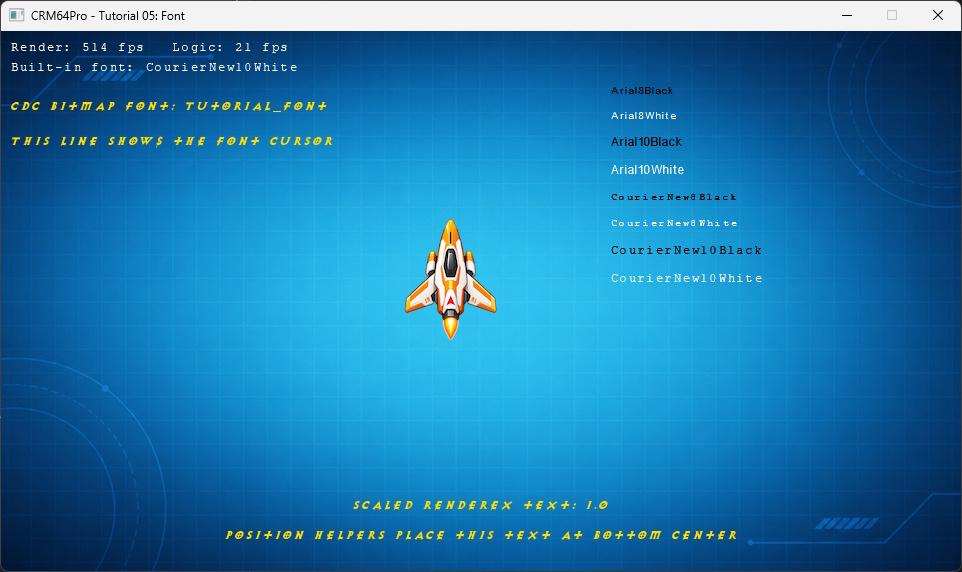
This tutorial extends Tutorial 04 with bitmap and built-in fonts. It adds a bitmap Font and its Image to the shared Tutorial.cdc, reloads the runtime resources, and compares all embedded Arial and Courier New variants.
It also demonstrates text positioning, a text cursor, scaling, color modulation, live frame-rate text and a DebugWindow that starts hidden.
Font::save() can create a new archive, but this tutorial must extend the archive prepared by the earlier tutorials. The prerequisite check prevents an incomplete font-only Tutorial.cdc from being created.
The font image is loaded through ImageMgr and uses black as its transparent color. FontMgr creates an empty Font, then assignImage() transfers ownership of the Image to it. The tutorial configures its spacing and cursor character.
Font::save() stores both the Font block and its owned Image block. Closing the temporary Font also releases the Image before a fresh runtime copy is loaded.
The background, ship and cursor retain their existing CDC names. Load the Cursor from Tutorial.cdc, then select and show it.
FontMgr loads the saved resource by name. A Font renders through an Image, so changing that Image's color modulation changes the text color.
FontMgr::getBuiltin() returns the requested embedded Font. The tutorial loads one font for status text and all eight variants for the visual comparison.
The built-in Font displays live frame rates. The bitmap Font demonstrates normal rendering, its configured text cursor, Position helpers and renderEx() scaling.
Plus and minus clamp the scale between 0.5 and 2.0. After event processing, a quit request exits before the final state and logic update.
Fonts and cursors can own Images, so they are closed before ImageMgr and the CDC archives.
The tutorial source is authoritative. The following listing is included directly from validation/source/Tutorial_05_Font.cpp.
#include "CRM64Pro.h"
#include "RunParameter.h"
#define BASEDIR "Base/"
#ifdef CRM64PRO_PLATFORM_WINDOWS
#define OUTPUTDIR "Win64/"
#elif defined(CRM64PRO_PLATFORM_LINUX)
#define OUTPUTDIR "Linux/"
#elif defined(CRM64PRO_PLATFORM_MACOS)
#define OUTPUTDIR "macOS/"
#endif
#define RESOURCE_FONT_IMAGE BASEDIR"in_font.png"
#define RESOURCE_BG_CDC_NAME "Tutorial_bg"
#define RESOURCE_PLAYER_CDC_NAME "Tutorial_ship"
#define RESOURCE_CURSOR_CDC_NAME "Tutorial_cursor"
#define RESOURCE_FONT_CDC_NAME "Tutorial_font"
#define OUTPUT_CDC OUTPUTDIR"Tutorial.cdc"
static const Sint32 iLogicRate = 20;
static const Sint32 iRenderRate = 0;
static const Sint32 iScreenW = 960;
static const Sint32 iScreenH = 540;
static const float fMoveSpeed = 220.0f;
static const Sint32 iBuiltinSampleCount = 8;
static const char* szBuiltinSampleNames[iBuiltinSampleCount] = {
"Arial8Black",
"Arial8White",
"Arial10Black",
"Arial10White",
"CourierNew8Black",
"CourierNew8White",
"CourierNew10Black",
"CourierNew10White"
};
struct TutorialState
{
Sint32 idBgImage = -1;
Sint32 idPlayerImage = -1;
Sint32 idCursor = -1;
Sint32 idBitmapFont = -1;
Sint32 idBuiltInFont = -1;
Sint32 idBuiltinSamples[iBuiltinSampleCount] = {-1, -1, -1, -1, -1, -1, -1, -1};
Sint32 idDebugWindow = -1;
float fPlayerX = 386.0f;
float fPlayerY = 186.0f;
float fMouseX = 0.0f;
float fMouseY = 0.0f;
float fFontScale = 1.0f;
Sint32 iCurrentRenderRate = 0;
Sint32 iCurrentLogicRate = 0;
Sint32 iLogicFrames = 0;
bool bMoveLeft = false;
bool bMoveRight = false;
bool bMoveUp = false;
bool bMoveDown = false;
};
static float clampFloat(float fValue, float fMin, float fMax)
{
if(fValue < fMin) return fMin;
if(fValue > fMax) return fMax;
return fValue;
}
static void logTaskOk(
Log& mLog)
{
}
static void logTaskFailed(
Log& mLog, Sint32 iCode)
{
mLog.msg(
LL_ERROR,
"FAILED (Code %d)\n", iCode);
}
static void logTaskFailed(
Log& mLog)
{
}
static void updateLogic(TutorialState& rState,
Image* pPlayerImage,
float fDeltaTime)
{
if(!pPlayerImage) return;
float fDX = 0.0f;
float fDY = 0.0f;
if(rState.bMoveLeft) fDX -= fMoveSpeed * fDeltaTime;
if(rState.bMoveRight) fDX += fMoveSpeed * fDeltaTime;
if(rState.bMoveUp) fDY -= fMoveSpeed * fDeltaTime;
if(rState.bMoveDown) fDY += fMoveSpeed * fDeltaTime;
const float fMaxX =
static_cast<float>(iScreenW - pPlayerImage->
getWidth());
const float fMaxY =
static_cast<float>(iScreenH - pPlayerImage->
getHeight());
rState.fPlayerX = clampFloat(rState.fPlayerX + fDX, 0.0f, fMaxX);
rState.fPlayerY = clampFloat(rState.fPlayerY + fDY, 0.0f, fMaxY);
rState.iLogicFrames++;
}
static void renderText(
Font* pBitmapFont,
Font* pBuiltInFont,
const TutorialState& rState)
{
if(pBuiltInFont)
{
char szRates[96];
snprintf(szRates, sizeof(szRates), "Render: %d fps Logic: %d fps", rState.iCurrentRenderRate, rState.iCurrentLogicRate);
pBuiltInFont->
render(szRates);
pBuiltInFont->
render(
"Built-in font: CourierNew10White");
}
if(!pBitmapFont) return;
pBitmapFont->
render(
"CDC bitmap font: Tutorial_font");
pBitmapFont->
render(
"This line shows the font cursor",
true, 14);
char szScale[96];
snprintf(szScale, sizeof(szScale), "Scaled renderEx text: %.1f", rState.fFontScale);
pBitmapFont->
renderEx(szScale,
false, -1, rState.fFontScale, rState.fFontScale);
pBitmapFont->
render(
"Position helpers place this text at bottom center");
}
static void renderBuiltinFontSamples(const TutorialState& rState)
{
Sint32 iY = 55;
for(Sint32 i = 0; i < iBuiltinSampleCount; ++i)
{
Font* pFont = mFontMgr.
get(rState.idBuiltinSamples[i]);
if(pFont)
{
pFont->
render(szBuiltinSampleNames[i]);
}
}
}
static void renderFrame(
Image* pBgImage,
Image* pPlayerImage,
Font* pBitmapFont,
Font* pBuiltInFont,
const TutorialState& rState)
{
if(pBgImage) pBgImage->
render();
if(pPlayerImage)
{
SDL_FRect rDst = {
rState.fPlayerX,
rState.fPlayerY,
static_cast<float>(pPlayerImage->
getWidth()),
static_cast<float>(pPlayerImage->
getHeight())
};
pPlayerImage->
render(0,
nullptr, &rDst);
}
renderText(pBitmapFont, pBuiltInFont, rState);
renderBuiltinFontSamples(rState);
}
static Sint32 renderWrapper(Sint32, void* pObj)
{
TutorialState* pState = static_cast<TutorialState*>(pObj);
if(!pState) return 0;
renderFrame(pBgImage, pPlayerImage, pBitmapFont, pBuiltInFont, *pState);
return 0;
}
{
if(!pDebug) return;
}
static bool addFontToCDC(
Main& mC64,
Log& mLog)
{
mLog.msg(
LL_INFO,
" Find Tutorial 04 CDC: %s ... ", OUTPUT_CDC);
{
logTaskFailed(mLog);
return false;
}
logTaskOk(mLog);
mLog.msg(
LL_INFO,
" Load bitmap font image: %s ... ", RESOURCE_FONT_IMAGE);
if(idFontImage < 0 || pFontImage == nullptr)
{
logTaskFailed(mLog, idFontImage);
return false;
}
logTaskOk(mLog);
mLog.msg(
LL_INFO,
" Create font from image ... ");
Sint32 idFontFile = mC64.
fontMgr().
create(RESOURCE_FONT_CDC_NAME);
if(idFontFile < 0 || pFontFile == nullptr)
{
logTaskFailed(mLog, idFontFile);
return false;
}
{
logTaskFailed(mLog);
return false;
}
logTaskOk(mLog);
mLog.msg(
LL_INFO,
" Save font to CDC ... ");
if(pFontFile->
save(OUTPUT_CDC, RESOURCE_FONT_CDC_NAME) < 0)
{
logTaskFailed(mLog);
return false;
}
logTaskOk(mLog);
mLog.msg(
LL_INFO,
" Close temporary font ... ");
logTaskOk(mLog);
return true;
}
int main(int argc, char* argv[])
{
if(!runParameterReadRender(argc, argv, eRenderer)) return 1;
TutorialState state;
mLog.msg(
LL_INFO,
"\nSETUP: screen and timing\n");
mLog.msg(
LL_INFO,
" Initialize timer ... ");
{
logTaskFailed(mLog);
return -1;
}
logTaskOk(mLog);
mLog.msg(
LL_INFO,
" Set frame rates (render=%d, logic=%d) ... ", iRenderRate, iLogicRate);
{
logTaskFailed(mLog);
return -1;
}
logTaskOk(mLog);
pScreen->
setSize(iScreenW, iScreenH);
pScreen->
setTitle(
"CRM64Pro - Tutorial 05: Font");
mLog.msg(
LL_INFO,
" Create screen (%dx%d) ... ", iScreenW, iScreenH);
{
return -1;
}
logTaskOk(mLog);
mLog.msg(
LL_INFO,
" Set render callback ... ");
if(!pScreen->
setRenderCallback([&state](Sint32 iMode) { return renderWrapper(iMode, &state); }))
{
logTaskFailed(mLog);
return -1;
}
logTaskOk(mLog);
mLog.msg(
LL_INFO,
"\nRESOURCES: add font and load from CDC\n");
if(!addFontToCDC(mC64, mLog))
{
return -1;
}
mLog.msg(
LL_INFO,
" Load background image from CDC ... ");
state.idBgImage = mC64.
imageMgr().
load(OUTPUT_CDC, RESOURCE_BG_CDC_NAME);
if(state.idBgImage < 0)
{
logTaskFailed(mLog, state.idBgImage);
return -1;
}
logTaskOk(mLog);
mLog.msg(
LL_INFO,
" Load ship image from CDC ... ");
state.idPlayerImage = mC64.
imageMgr().
load(OUTPUT_CDC, RESOURCE_PLAYER_CDC_NAME);
if(state.idPlayerImage < 0)
{
logTaskFailed(mLog, state.idPlayerImage);
return -1;
}
logTaskOk(mLog);
if(pPlayerImage == nullptr)
{
logTaskFailed(mLog);
return -1;
}
mLog.msg(
LL_INFO,
" Load cursor from CDC ... ");
state.idCursor = mC64.
cursorMgr().
load(OUTPUT_CDC, RESOURCE_CURSOR_CDC_NAME);
if(state.idCursor < 0 || pCursor == nullptr)
{
logTaskFailed(mLog, state.idCursor);
return -1;
}
logTaskOk(mLog);
mLog.msg(
LL_INFO,
" Select cursor ... ");
{
logTaskFailed(mLog);
return -1;
}
logTaskOk(mLog);
mLog.msg(
LL_INFO,
" Load bitmap font from CDC ... ");
state.idBitmapFont = mC64.
fontMgr().
load(OUTPUT_CDC, RESOURCE_FONT_CDC_NAME);
if(state.idBitmapFont < 0 || pBitmapFont == nullptr)
{
logTaskFailed(mLog, state.idBitmapFont);
return -1;
}
logTaskOk(mLog);
if(pBitmapFontImage) pBitmapFontImage->
setColorMod(255, 220, 120);
mLog.msg(
LL_INFO,
" Load built-in font ... ");
if(state.idBuiltInFont < 0 || pBuiltInFont == nullptr)
{
logTaskFailed(mLog, state.idBuiltInFont);
return -1;
}
logTaskOk(mLog);
mLog.msg(
LL_INFO,
" Load embedded font samples ... ");
for(Sint32 i = 0; i < iBuiltinSampleCount; ++i)
{
if(state.idBuiltinSamples[i] < 0 || mC64.
fontMgr().
get(state.idBuiltinSamples[i]) ==
nullptr)
{
logTaskFailed(mLog, state.idBuiltinSamples[i]);
return -1;
}
}
logTaskOk(mLog);
mLog.msg(
LL_INFO,
"\nTOOLS: debug window and console\n");
mLog.msg(
LL_INFO,
" Create debug window ... ");
if(!pDebug)
{
logTaskFailed(mLog, state.idDebugWindow);
return -1;
}
pDebug->
addWatch(
"Player X",
nullptr, &state.fPlayerX);
pDebug->
addWatch(
"Player Y",
nullptr, &state.fPlayerY);
pDebug->
addWatch(
"Mouse X",
nullptr, &state.fMouseX);
pDebug->
addWatch(
"Mouse Y",
nullptr, &state.fMouseY);
pDebug->
addWatch(
"Font scale",
nullptr, &state.fFontScale);
pDebug->
addWatch(
"Render fps", &state.iCurrentRenderRate);
pDebug->
addWatch(
"Logic fps", &state.iCurrentLogicRate);
pDebug->
addWatch(
"Logic frames", &state.iLogicFrames);
logTaskOk(mLog);
if(pConsole) pConsole->
print(
"Tutorial 05: Font ready. Press ` to toggle the console.\n");
mLog.msg(
LL_INFO,
" [Q] / [ESC] Quit\n");
mLog.msg(
LL_INFO,
" [Arrow Keys] Move the ship image\n");
mLog.msg(
LL_INFO,
" [+] / [-] Change font scale\n");
mLog.msg(
LL_INFO,
" [D] Toggle debug window\n");
mLog.msg(
LL_INFO,
" [`] Toggle console\n");
mLog.msg(
LL_INFO,
" Any key or mouse button logs the input event\n");
SDL_Event event;
bool bRunning = true;
while(bRunning)
{
{
if(event.type == SDL_EVENT_QUIT)
{
bRunning = false;
}
else if(event.type == SDL_EVENT_KEY_DOWN)
{
mLog.msg(
LL_INFO,
" Key pressed: %s (%d)\n", SDL_GetKeyName(event.key.key), event.key.key);
if(event.key.key == SDLK_Q || event.key.key == SDLK_ESCAPE)
{
bRunning = false;
}
else if(event.key.key == SDLK_LEFT)
{
state.bMoveLeft = true;
}
else if(event.key.key == SDLK_RIGHT)
{
state.bMoveRight = true;
}
else if(event.key.key == SDLK_UP)
{
state.bMoveUp = true;
}
else if(event.key.key == SDLK_DOWN)
{
state.bMoveDown = true;
}
else if(event.key.key == SDLK_PLUS || event.key.key == SDLK_KP_PLUS)
{
state.fFontScale = clampFloat(state.fFontScale + 0.1f, 0.5f, 2.0f);
}
else if(event.key.key == SDLK_MINUS || event.key.key == SDLK_KP_MINUS)
{
state.fFontScale = clampFloat(state.fFontScale - 0.1f, 0.5f, 2.0f);
}
else if(event.key.key == SDLK_D)
{
toggleDebugWindow(pDebug);
}
}
else if(event.type == SDL_EVENT_KEY_UP)
{
if(event.key.key == SDLK_LEFT) state.bMoveLeft = false;
else if(event.key.key == SDLK_RIGHT) state.bMoveRight = false;
else if(event.key.key == SDLK_UP) state.bMoveUp = false;
else if(event.key.key == SDLK_DOWN) state.bMoveDown = false;
}
else if(event.type == SDL_EVENT_MOUSE_BUTTON_DOWN)
{
mLog.msg(
LL_INFO,
" Mouse clicked: button %d at %d, %d\n", event.button.button, (Sint32)event.button.x, (Sint32)event.button.y);
}
}
if(!bRunning) break;
state.iCurrentRenderRate =
static_cast<Sint32
>(mC64.
timer().getCurrentRFR());
state.iCurrentLogicRate =
static_cast<Sint32
>(mC64.
timer().getCurrentLFR());
updateLogic(state, pPlayerImage, 1.0f / static_cast<float>(iLogicRate));
}
mLog.msg(
LL_INFO,
" Close debug window ... ");
logTaskOk(mLog);
mLog.msg(
LL_INFO,
" Close fonts ... ");
logTaskOk(mLog);
mLog.msg(
LL_INFO,
" Close cursors ... ");
logTaskOk(mLog);
mLog.msg(
LL_INFO,
" Close images ... ");
logTaskOk(mLog);
mLog.msg(
LL_INFO,
" Close CDC archives ... ");
logTaskOk(mLog);
return 0;
}
Sint32 close(Sint32 idCDC) override
Close and destroy a CDC object.
Definition CoreArchive.cpp:2476
Screen * get(Sint32 idScreen=0)
Get a pointer to the screen using its handle.
Definition CoreConfig.cpp:1497
void setMTFriendly(Uint8 iDelayMS)
Set the multithread-friendly scheduler yield.
Definition CoreConfig.cpp:1183
Console Object class.
Definition CRM64Pro.h:9678
Cursor Object class.
Definition CRM64Pro.h:3734
float getY() const
Get the mouse cursor Y position.
Definition GraphicsCursor.cpp:1041
Sint32 select(Sint32 idCursor)
Select a mouse cursor.
Definition GraphicsCursor.cpp:968
bool show()
Make visible the selected mouse cursor.
Definition GraphicsCursor.cpp:1001
Sint32 load(const string &sCDCFile, const string &sName)
Load a cursor stored in a CDC file.
Definition GraphicsCursor.cpp:1115
Sint32 close(Sint32 idCursor) override
Close and destroy a cursor.
Definition GraphicsCursor.cpp:897
Cursor * get(Sint32 idCursor)
Get a pointer to the cursor using its handle.
Definition GraphicsCursor.cpp:962
float getX() const
Get the mouse cursor X position.
Definition GraphicsCursor.cpp:1035
DebugWindow Object class.
Definition CRM64Pro.h:9810
Font Object class.
Definition CRM64Pro.h:4741
bool setTextCursor(Uint8 cCursor)
Set the text input cursor character.
Definition GraphicsFont.cpp:888
Sint32 getImage() const
Get the assigned Image of this font.
Definition GraphicsFont.cpp:882
Sint32 getHeight() const
Get the height of this font (in pixels).
Definition GraphicsFont.cpp:1025
Sint32 render(const string &sText, bool bShowCursor=false, Sint32 iCurPos=-1, Sint32 idRes=0)
Render a text using this font.
Definition GraphicsFont.cpp:1095
Sint32 assignImage(Sint32 idImage, Sint32 iOwnership=0)
Assign an Image to this font.
Definition GraphicsFont.cpp:811
Sint32 save(const string &sCDCFile, const string &sResourceName="")
Save the font to a CDC file.
Definition GraphicsFont.cpp:1110
bool setKerning(Sint32 iKer)
Set the kerning value.
Definition GraphicsFont.cpp:946
Sint32 renderEx(const string &sText, bool bShowCursor=false, Sint32 iCurPos=-1, float fScaleX=1.0f, float fScaleY=1.0f, double dAngle=0.0, const SDL_FPoint *pCenter=nullptr, SDL_FlipMode rf=SDL_FLIP_NONE, Sint32 idRes=0)
Render a text using this font.
Definition GraphicsFont.cpp:1101
bool setPosition(const Position &rPosX, const Position &rPosY, bool bInterpolate=false)
Set the font position.
Definition GraphicsFont.cpp:1037
bool setSpaceWidth(Sint32 iWidth)
Set the space character width.
Definition GraphicsFont.cpp:959
Font Manager class.
Definition CRM64Pro.h:4916
bool info(Sint32 iMode=0) override
Request Font Manager information.
Definition GraphicsFont.cpp:1280
Sint32 getBuiltin(const string &sName)
Get a built-in embedded font id using its name.
Definition GraphicsFont.cpp:1436
Sint32 close(Sint32 idFont) override
Close and destroy a font.
Definition GraphicsFont.cpp:1363
Sint32 create(const string &sName, Uint32 iVersion=10) override
Create a new font.
Definition GraphicsFont.cpp:1322
Font * get(const string &sName)
Get a pointer to the font using its name.
Definition GraphicsFont.cpp:1235
Sint32 load(const string &sCDCFile, const string &sName)
Load a font stored in a CDC file.
Definition GraphicsFont.cpp:1513
Image Object class.
Definition CRM64Pro.h:3356
Sint32 setColorKey(Sint16 iR=-1, Sint16 iG=-1, Sint16 iB=-1)
Set colorkey used for rendering this image.
Definition GraphicsImage.cpp:1754
Sint32 getHeight() const
Get the image height.
Definition GraphicsImage.cpp:1839
bool setColorMod(Uint8 iR, Uint8 iG, Uint8 iB)
Set the color modulation value.
Definition GraphicsImage.cpp:1736
Sint32 getWidth() const
Get the image width.
Definition GraphicsImage.cpp:1833
Sint32 render(Sint32 idRes=0, SDL_FRect *pSrc=nullptr, SDL_FRect *pDst=nullptr)
Render the image.
Definition GraphicsImage.cpp:1575
Image * get(Sint32 idImg)
Get a pointer to the image using its handle.
Definition GraphicsImage.cpp:2279
Sint32 loadFromFile(const string &sFile, const string &sName="")
Load an image from an external file (BMP, PNG, JPG, PCX, TGA or WebP formats).
Definition GraphicsImage.cpp:2434
Sint32 load(const string &sCDCFile, const string &sName)
Load an image stored in a CDC file.
Definition GraphicsImage.cpp:2476
Sint32 close(Sint32 idImg) override
Close and destroy an image.
Definition GraphicsImage.cpp:2178
Log Object class.
Definition CRM64Pro.h:771
CRM64Pro GDK Main class.
Definition CRM64Pro.h:502
Screen Object class.
Definition CRM64Pro.h:1055
Sint32 show()
Show the screen.
Definition CoreConfig.cpp:362
Sint32 setDriver(eConfigRendererDriver eCRD)
Set the renderer driver.
Definition CoreConfig.cpp:454
bool setRenderCallback(RenderCallback fnCallback)
Set a callback function for rendering graphics at Render Frame Rate.
Definition CoreConfig.cpp:765
Sint32 setSize(Sint32 iWidth, Sint32 iHeight)
Set the size of the screen.
Definition CoreConfig.cpp:526
bool setTitle(const string &sName)
Set the title.
Definition CoreConfig.cpp:674
void setStatsLevel(eMemStatsLevel eMSL)
Set the memory stats gathering level.
Definition CMemoryManager.cpp:618
void destroy()
Releases the internal heap and displays final stats.
Definition CMemoryManager.cpp:954
@ MSL_NORMAL
Collect allocations per module (CRM64Pro and user). Default for debug builds.
Definition CRM64Pro.h:386
eConfigRendererDriver
Screen renderer drivers.
Definition CRM64Pro.h:1013
@ CRD_SOFTWARE
Screen::setDriver(): software renderer driver. Slow but works on all platforms.
Definition CRM64Pro.h:1015
Sint32 create(const string &sName, Uint32 iType=CRM64PRO_GUI_PANEL) override
Creates a new GUI object.
Definition GUI.cpp:1051
Sint32 addWatch(const string &sName, Sint32 *iIntegerVar, float *fFloatVar=nullptr)
Add a watch.
Definition GUIDebugWindow.cpp:275
#define CRM64PRO_GUI_DEBUGWINDOW
Definition CRM64Pro.h:9195
Widget & baseWidget()
Get the reference to base Widget for this object.
Definition GUIDebugWindow.cpp:269
Sint32 print(const char *format,...)
Print a formatted message to the console.
Definition GUIConsole.cpp:403
Console * getConsole(Sint32 idGUI=CRM64PRO_GUI_CONSOLE)
Get a pointer to a Console using its handle.
Definition GUI.cpp:1366
DebugWindow * getDebugWindow(Sint32 idGUI)
Get a pointer to a DebugWindow using its handle.
Definition GUI.cpp:1375
Sint32 close(Sint32 idGUI) override
Close and destroy a GUI object.
Definition GUI.cpp:1168
Log * get(Sint32 idLog=0)
Get a pointer to the log object.
Definition CoreLog.cpp:921
bool init(const string &sAppname, eLogLevel eLL, eLogMode eLM, const string &sFilename="", const string &sAuthor="", const string &sEmail="", const string &sWeb="")
Initialize the log object.
Definition CoreLog.cpp:338
@ LM_FILE
Log output mode for the 'lm' parameter in CRM64Pro::Log::init(). Output to a file and overwrite exist...
Definition CRM64Pro.h:748
@ LM_STDOUT
Log output mode for the 'lm' parameter in CRM64Pro::Log::init(). Output to standard output (stdout).
Definition CRM64Pro.h:750
@ LL_INFO
Runtime events (startup/shutdown). Messages without timestamp.
Definition CRM64Pro.h:764
@ LL_DEBUG
Detailed information for flow control.
Definition CRM64Pro.h:765
@ LL_CRITICAL
Fatal errors, application crash, or assertions.
Definition CRM64Pro.h:761
@ LL_ERROR
Runtime errors that do not require immediate termination.
Definition CRM64Pro.h:762
GUIMgr & guiMgr()
Get reference to GUI Manager.
Definition CoreMain.cpp:808
Timer & timer()
Get reference to Timer module.
Definition CoreMain.cpp:730
Sint32 update(SDL_Event *evUser=nullptr)
Manage the GDK update cycle with a fixed virtual logic frame rate.
Definition CoreMain.cpp:451
ImageMgr & imageMgr()
Get reference to Image Manager.
Definition CoreMain.cpp:754
CursorMgr & cursorMgr()
Get reference to Cursor Manager.
Definition CoreMain.cpp:760
static void terminate()
Main explicit destructor.
Definition CoreMain.cpp:266
static Main & instance()
Access the Main singleton.
Definition CoreMain.cpp:252
LogMgr & logMgr()
Get reference to Log Manager.
Definition CoreMain.cpp:724
Tool & tool()
Get reference to Tool module.
Definition CoreMain.cpp:718
ArchiveMgr & archiveMgr()
Get reference to Archive Manager.
Definition CoreMain.cpp:736
FontMgr & fontMgr()
Get reference to Font Manager.
Definition CoreMain.cpp:778
ConfigMgr & configMgr()
Get reference to Config Manager.
Definition CoreMain.cpp:712
@ GS_SHOWN
General status: enabled and shown.
Definition CRM64Pro.h:300
@ PH_CENTER
Cursor::setHotSpot(): set hotspot to cursor_size/2. Sprite::setAnimHotSpot(): set hotspot to frame_si...
Definition CRM64Pro.h:336
@ PH_BOTTOM
Widget/Font: bottom with optional offset. Scene: align to map bottom/end (MapHeight - ViewportHeight)...
Definition CRM64Pro.h:338
@ PH_RIGHT
Widget/Font: right with optional offset. Scene: align to map right/end (MapWidth - ViewportWidth)....
Definition CRM64Pro.h:340
@ PH_TOP
Widget/Font: top with optional offset. Scene: align to map top/begin (0.0). Valid for Y axis.
Definition CRM64Pro.h:337
bool init(eTimerState eState=TS_INIT)
Initialize the timer system.
Definition CoreTimer.cpp:543
bool setRate(Uint16 iR, Uint16 iL)
Set preferred Render and Logic Frame Rate.
Definition CoreTimer.cpp:556
CRM64Pro GDK.
Definition AudioTrack.cpp:36
Absolute coordinate or helper-relative position used by layout APIs.
Definition CRM64Pro.h:346
The next tutorial introduces immediate GFX drawing and image filters.